
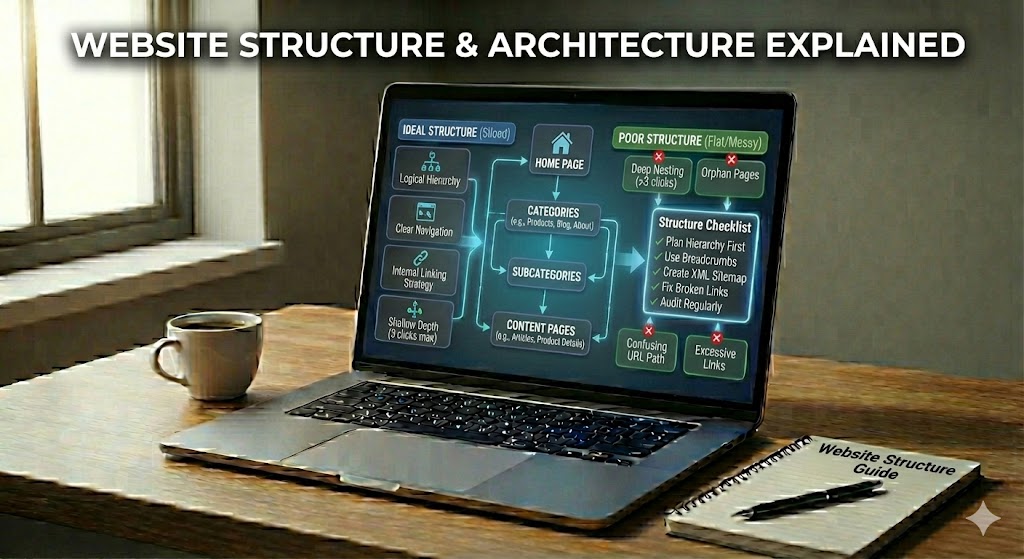
When you visit a website, you see pages, menus, and buttons. All these parts are not random; they follow a plan. This plan is called the website structure & architecture. It shows how pages are put together, how they connect, and how you move from one page to another.
A good structure helps both people and search engines. For people, it makes the site easy to use, so visitors can quickly find what they want without feeling lost. For search engines, a clear structure supports better crawling and indexing, so pages can show up in search results more often.
In this guide, you will learn what website structure is, how website architecture works, and why they are key for SEO and user experience. You will also see simple rules, common mistakes, and easy steps you can use to improve any site, even if you are a complete beginner.
Website Structure & Architecture
A well-organized site feels natural to use: menus make sense, pages appear where you expect them, and you rarely feel lost. That experience is not an accident. It comes from a deliberate plan that shapes how every part of a site fits together.
In simple terms, website structure & architecture describe how all pages are grouped, linked, and ranked in importance. Structure focuses on the way content is arranged, while architecture looks at the paths people and search robots follow to move through that content. Together, they form a kind of information hierarchy that tells both users and search engines what matters most.
A clear plan often includes a small number of main sections, each leading to more detailed pages. This helps create short, simple click paths and avoids long chains of steps that confuse visitors. When this layout is done well, menus, breadcrumbs, and internal links all point in the same logical direction, making the whole site easier to explore and easier for search engines to understand.
Introduction to Website Structure & Architecture
Before diving into specific techniques, it helps to see your site the way a visitor or crawler does. A scattered layout feels like a book with chapters in random order: readable, but slow and frustrating. A clear plan, on the other hand, turns that same content into a smooth journey.
In this context, website structure & architecture act like the table of contents and chapter layout of that book. They decide which sections exist, how deep each section goes, and how every page connects to others. This invisible plan shapes menus, links, and even how long it takes someone to find what they need.
For SEO, a strong setup gives crawlers a predictable, low-friction path through your content, which supports better coverage and helps important pages stand out. For people, it reduces effort: clear sections, consistent labels, and short click paths mean less guessing and more doing. When both sides are served well, rankings, engagement, and conversions all become easier to improve over time.
Core Concepts: What Is Website Structure?
To build a strong site, you first need to understand how its pages fit together. A well-planned structure acts like a map, showing where each topic lives and how visitors can move between them without confusion.
At its core, website structure is the way all your pages are grouped, ordered, and linked together. It shows which pages are main sections, which are subpages, and how a visitor can move from one idea to a related one in just a few clicks.
A solid plan usually starts with a home page at the top, a few main category pages under it, and more specific pages below those. This creates a simple tree-like layout that is easy for both people and search engines to follow.
- Top level: home and main sections (for example, “Services”, “Blog”, “Contact”).
- Middle level: category pages that group related topics.
- Lower level: detailed pages that answer very specific questions.
When this structure is clear, menus, breadcrumbs, and internal links all tell the same story about what belongs where and what matters most.
Understanding Website Architecture and Navigation
Once your basic structure is defined, the next step is turning it into real paths people can follow. This is where architecture and navigation take over, shaping the actual journey through your site.
Have you ever landed on a site and, without thinking, knew exactly where to click next? That smooth feeling comes from strong website architecture and smart navigation design, even if you never see the plan behind it.
Architecture describes the paths users and crawlers follow through your pages, while navigation is how those paths are shown with menus, links, and buttons. Together, they turn a simple structure into a usable, predictable journey that supports both SEO performance and visitor satisfaction.
Good navigation usually combines a few clear elements:
- Main menus that highlight the top sections of the site.
- Breadcrumbs that show where you are inside the hierarchy.
- Footer links that repeat key paths and support extra pages.
- Contextual internal links that move people between related topics.
When these parts line up with your underlying layout, users enjoy shorter click paths, search robots discover content more reliably, and important pages receive more internal authority through logical linking.
Why Website Structure Matters for SEO and Users
Clear concepts are helpful, but their real value shows up in everyday use. The way your pages are arranged quietly influences whether visitors stay, convert, and return—and whether search engines can surface your content at all.
Have you ever left a site just because you could not find what you needed fast enough? That moment is where good or bad website structure quietly decides if a visit continues or ends.
Behind the scenes, a clear layout gives search engines and people an easier path. When pages are grouped in a logical way, both can travel through your content with less effort and more success.
For search engines, a strong plan means better crawling and indexing. Bots can move from your home page to categories and then to detailed pages without hitting dead ends or confusing loops. This helps more of your pages appear in search results and makes it clearer which ones are most important.
For visitors, a neat layout reduces thinking time. Short click paths, simple labels, and consistent menus guide users to answers quickly, which often leads to longer sessions and more actions, like filling a form or making a purchase.
- Clear hierarchy helps search engines understand topic depth and relationships.
- Logical grouping makes it easier for users to scan and choose the right section.
- Efficient navigation supports lower bounce rates and higher engagement.
- Stable internal linking spreads authority to key pages and supports long-term SEO growth.
Flat vs Deep Structures: Choosing the Right Approach
After understanding why structure matters, you need to decide how many levels your site should have. The choice between a flatter or deeper layout affects both discoverability and ease of use.
Think of your site like a city map. Should every place be reachable in just a few turns, or should some areas sit far away at the edge? This choice between a flat and a deep structure shapes how fast visitors and search engines find your pages.
In a flat structure, most pages sit only a few clicks from the home page. This keeps click depth low and makes crawling easier. A simple layout might look like:
- Home → Category → Page
- Home → Page (for key, high-value content)
This approach works well for small or medium sites where you want many pages to share similar importance and be discovered quickly.
A deep structure uses many levels of categories and subcategories. This can organize large websites, but if pages hide 5–6 clicks away, they often get less traffic and weaker internal authority. That is why most SEO professionals aim for a hybrid layout: clear sections and sub-sections, yet keeping important pages within about 3 clicks from the start page.
Best Practices for Website Structure & Architecture
Choosing a basic layout is only the beginning. To keep your site usable as it grows, you need simple rules that guide where new content goes and how everything connects.
Have you ever felt lost on a site even though it only had a few pages? That usually happens when there is no simple plan behind how those pages connect. A few clear rules can prevent this and make every new page easier to place.
To keep things under control, start by creating logical groups of content. Place similar topics together, and avoid mixing many different ideas on one page. Each section should answer one clear need so visitors know they are in the right place as soon as they arrive.
Aim for short, predictable click paths. Try to keep key pages within about three clicks from the home page, and use menus, breadcrumbs, and internal links to support the same routes. This helps search engines follow a clean map and reduces the chances that users get stuck or give up.
Consistent labels are another simple but powerful rule. Use the same words in menus, URLs, and headings so people and crawlers can match sections quickly. When you add new pages, fit them into existing categories instead of creating many new, tiny sections that are hard to scan.
- Plan the hierarchy first on paper or a simple outline.
- Limit levels so the tree does not become too deep.
- Use internal links to connect related topics across categories.
- Review navigation often and remove links that nobody uses.
Improving Website Structure: Common Mistakes and Simple Fixes
Even with good intentions, many sites drift into confusion over time. Recognizing typical structural problems makes it much easier to correct them before they hurt SEO or user experience.
Have you ever clicked around a site and felt like every path was a dead end? That feeling usually comes from a few small but serious layout problems, not from the design colors or fonts.
In this part, you will see typical errors beginners make and how to fix them with clear, easy steps. Each issue has a simple change you can apply, even if you are new to Website Structure & Architecture.
One frequent problem is having too many top-level pages. When everything sits in the main menu, nothing feels important. Move related pages into logical groups so the menu only shows your main sections.
Another mistake is using vague labels like “Stuff” or “More”. Replace them with clear words such as “Blog”, “Services”, or “Help” so both visitors and crawlers understand each section’s role.
- Orphan pages with no internal links → add links from at least one category or related page.
- Very deep click paths (4–5+ steps) → shorten the route with better menus and breadcrumbs.
- Duplicate sections that cover the same topic → merge them into a single, stronger page.
Some sites also ignore internal linking across related topics. Add simple links like “You may also like…” so users can move naturally and important pages share more authority.
Bringing Website Structure & Architecture Together for Long-Term SEO Success
All of these ideas come together in one goal: turning separate pages into a connected, reliable system. When structure and architecture support each other, both users and search engines benefit over the long term.
When you step back, website structure & architecture are simply your site’s plan and the roads that run through it. A clear hierarchy, short click paths, and helpful internal links work together to guide both users and crawlers, turning a loose set of pages into a coherent information system.
By choosing a sensible balance between flat and deep layouts, using logical categories, and fixing common issues like orphan pages and vague labels, you create a site that is easier to navigate, easier to index, and easier to grow. Over time, this stable foundation quietly supports better rankings, stronger engagement, and smoother journeys for every visitor.
Think of your structure as a living map: review it, tidy it, and expand it with care as your content grows. When you treat Website Structure & Architecture as an ongoing practice instead of a one-time task, you build a site that can adapt, scale, and continue to perform well for both people and search engines in the long run.