
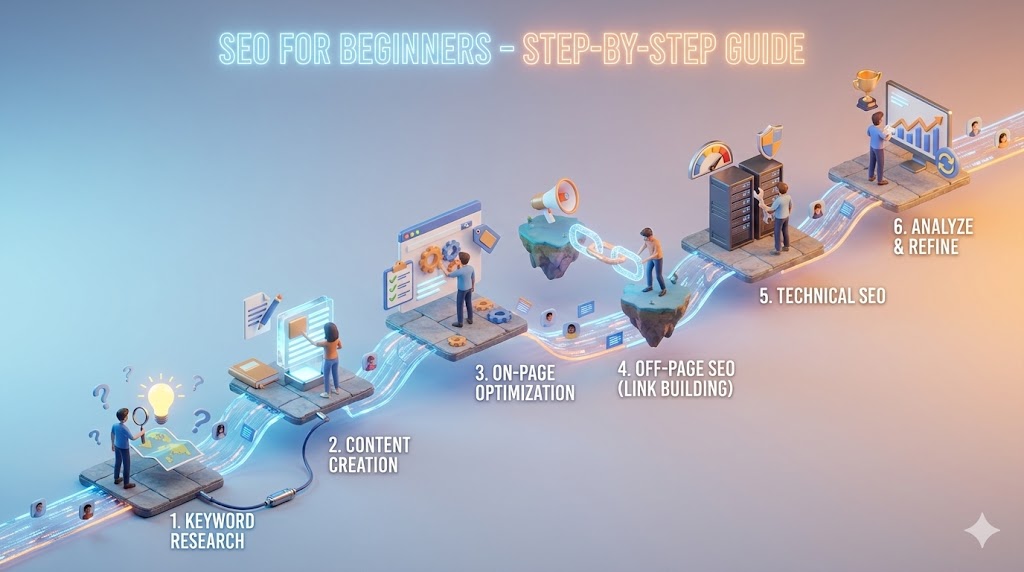
Learning SEO can feel difficult when you first hear terms such as crawling, indexing, search intent, backlinks and technical optimisation. The good news is that you do not need to learn everything at once. You can build a strong foundation by working through a clear sequence: understand your audience, research topics, publish useful pages, make your website accessible, and measure what happens.
This guide is a practical learning path for students, website owners, freelancers and new marketers. It focuses on actions you can practise on a real website, not shortcuts or promises of quick rankings.
What You Will Learn
- How search engines discover, index and rank pages.
- How to research keywords and understand search intent.
- How to create and optimise useful website pages.
- How to check basic technical SEO issues.
- How to use Google Search Console to measure search performance.
- How to practise SEO through a structured 30-day plan.
1. Understand the Three Main Stages of Google Search
Before changing a website, understand how a search engine handles a page. Google Search broadly works through three stages:
- Crawling: automated systems discover pages and download their content.
- Indexing: Google analyses and may store information about a page in its index. Not every crawled page is indexed.
- Serving results: when someone searches, Google’s systems select and order relevant results for that query.
These stages are different. A page can be crawled but not indexed, or indexed without receiving meaningful visibility. SEO helps search engines access and understand your content, while helping visitors decide whether it answers their needs. No SEO checklist guarantees indexing or a first-page position.
2. Learn the Main Areas of SEO
SEO work is often grouped into several connected areas:
- Keyword research and search intent: understanding the language and purpose behind searches.
- On-page SEO: improving page titles, headings, content, images and internal links.
- Technical SEO: helping search engines access, render and understand important pages.
- Off-page SEO: earning relevant mentions, editorial links and recognition outside your website.
- Local SEO: improving visibility for relevant searches connected to a business’s real-world location.
- Measurement: using data to understand search visibility, traffic and useful outcomes.
Start with the basics of content, keywords and on-page improvements. Learn more advanced technical and off-page work as your confidence grows. For a broader explanation, read What Is SEO?.
3. Choose a Website to Practise On
The fastest way to understand SEO is to practise on a website you own or have permission to work on. It could be a personal blog, a small business website, a portfolio or a test WordPress installation.
Before making changes, record a baseline:
- Website address and main purpose.
- Who the intended visitors are.
- Five important pages and what each page should help a visitor do.
- Whether Google Search Console and Google Analytics 4 are installed, where appropriate.
- Current clicks, impressions and top queries in Search Console, if data is available.
Do not change many things at once. Keep a simple change log with the page URL, date, change made and reason. This helps you learn which changes may have influenced later results.
4. Practise Keyword Research With a Simple Exercise
Keyword research begins with your audience, not a tool’s search-volume number. Imagine you run a website for a local plumbing business. A visitor might search for “emergency plumber”, “tap repair” or “plumber in [suburb]”. These searches suggest different needs and should not automatically be forced onto one page.
A beginner keyword research process
- Choose one topic: select a product, service or question that your website genuinely covers.
- Write audience phrases: list the words a potential visitor might use.
- Check search results: search the phrases and study the type of pages Google displays. Look for the problem the results are trying to solve.
- Review related questions: note useful variations and follow-up questions.
- Group by intent: separate learning, comparison, purchase and local-service searches.
- Map phrases to pages: choose one main topic for each page and add closely related subtopics where they fit naturally.
Practice task: write down 10 phrases for one business or topic. Label each as informational, commercial investigation, transactional or local. Then select one phrase and write the question the searcher needs answered.
Do not create a separate page for every tiny keyword variation. Closely related searches may be better served by one complete page. Avoid repeating keywords unnaturally.
5. Create Content That Solves a Real Problem
A useful page should satisfy the visitor’s purpose. Before writing, answer these questions:
- Who is this page for?
- What question or task brought the visitor here?
- What should the visitor understand or be able to do after reading?
- What practical detail, example or first-hand experience can make this page more useful?
Use a clear structure: a descriptive title, a direct introduction, logical headings, useful explanations, examples where appropriate and a relevant next step. Cite reliable sources for factual claims. Keep information accurate and update it when something material changes.
Do not write to an arbitrary word count or publish many similar pages just to target search phrases. Google’s guidance recommends helpful, reliable, people-first content that adds value for visitors.
6. Complete the On-Page SEO Basics
For each important page, use this practical checklist:
- Title: write a unique, descriptive page title that accurately represents the content.
- Main heading: make the main heading clear and consistent with the page topic.
- Introduction: explain quickly what the visitor will find.
- Subheadings: divide the content into useful sections that are easy to scan.
- Natural language: include relevant phrases where they help readers understand the topic. Avoid keyword stuffing.
- Internal links: link to related pages using descriptive anchor text.
- Images: use relevant images, suitable file sizes and meaningful alternative text when an image conveys information.
- URL: use a readable URL. Avoid changing established URLs without a clear migration and redirect plan.
- Call to action: make the next useful step clear where it fits the page’s purpose.
A meta description can help summarise a page for searchers, but Google may generate a different snippet for a query. Treat it as a useful summary, not a guaranteed ranking control.
7. Learn the Technical SEO Checks That Matter First
You do not need to become a developer to recognise common technical issues. Begin with these checks and ask a developer for help when a fix requires code or server access.
- HTTPS: make sure the website uses a secure connection and that important pages load correctly.
- Mobile usability: check key pages on a phone and make sure text, navigation and buttons work.
- Page access: confirm important pages are not unintentionally blocked from crawling.
- Indexing controls: check that pages intended for search are not accidentally marked noindex.
- Status codes: investigate important pages returning errors or unexpected redirects.
- Canonical URLs: use appropriate canonical signals where duplicate or similar URLs need to be consolidated.
- Sitemap: keep an accurate XML sitemap containing the canonical URLs you want search engines to discover.
- Images and performance: resize and compress large images, and investigate poor real-user performance.
- Broken links: fix important broken internal links and provide useful navigation.
Do not block a URL in robots.txt as a substitute for a noindex directive. These controls serve different purposes. Also remember that a sitemap helps discovery; submitting one does not guarantee that every listed URL will be indexed.
8. Set Up Google Search Console
Google Search Console is one of the most useful free tools for learning SEO. It helps site owners understand how their website performs in Google Search and identify some technical and indexing issues.
Your first Search Console tasks
- Add and verify the correct website property.
- Open the Performance report and select the Web search results view.
- Review clicks, impressions, average click-through rate and average position.
- Switch between Queries and Pages to see which searches and URLs receive visibility.
- Use country and device filters to understand differences in performance.
- Open URL Inspection for an important page to check Google’s reported indexing information and test the live URL when needed.
- Review the Page Indexing and Sitemaps reports for issues that need investigation.
Understand the metrics: clicks are visits from Google Search results; impressions are appearances in search results; CTR is clicks divided by impressions; average position is an aggregate measure and can vary by query, location and device.
Compare similar date ranges and look for patterns rather than reacting to one day’s movement. A low CTR may suggest that the result’s title or snippet could be clearer, but first check the query, position and search intent. Search Console data is not a complete record of every search, and some queries may be anonymised.
9. Use a Small, Useful SEO Toolkit
Start with free tools. Add paid tools only when you understand the problem they will help you solve.
- Google Search Console: search visibility, queries, indexing and sitemap reports.
- Google Analytics 4: website activity and events after visitors arrive, when configured correctly.
- PageSpeed Insights: performance diagnostics and real-user experience data where available.
- Google Trends: explore relative interest in topics over time and by region.
- Screaming Frog SEO Spider: crawl a website to inspect titles, status codes, links and other page elements.
- Ahrefs or Semrush: optional paid platforms for keyword, competitor and backlink research. Their estimates are not the same as Google’s data.
You can learn the core workflow without buying every SEO tool on the market.
10. Understand Backlinks and Off-Page SEO
A backlink is a link from another website to yours. Relevant editorial links can help people discover useful resources and provide context about how pages relate to each other. Focus on earning links through original resources, useful research, genuine partnerships and relevant digital PR.
Avoid buying links intended to manipulate rankings, automated link schemes, mass directory submissions and other manipulative practices. A large backlink count is not a measure of quality. Read Backlinks Explained and What Is Off-Page SEO? for more detail.
11. Your 30-Day SEO Learning and Practice Plan
Use this plan to build a working foundation. The goal is to complete useful tasks and understand the process, not to promise a ranking result within 30 days.
| Period | Learning focus | Practical tasks | Deliverable |
|---|---|---|---|
| Days 1–5 | SEO foundations | Learn crawling, indexing, search intent and the main SEO areas. Select a practice website and record its baseline. | Website and page inventory |
| Days 6–10 | Keyword research | Research 10–20 audience phrases. Review search results, group by intent and map topics to existing or planned pages. | Keyword and page map |
| Days 11–15 | Content and on-page SEO | Improve one important page’s title, headings, introduction, usefulness, internal links and image information. | One improved page and change log |
| Days 16–20 | Technical SEO | Check mobile layout, HTTPS, status codes, indexability, sitemap and important broken links. | Technical issue checklist |
| Days 21–25 | Search Console and analytics | Verify Search Console, inspect key URLs and review performance reports. Check analytics events if configured. | Baseline performance report |
| Days 26–30 | Review and next steps | Review the work, document lessons, prioritise remaining issues and plan the next month. | 30-day SEO action plan |
12. Common SEO Mistakes Beginners Should Avoid
- Expecting a new page to rank immediately.
- Choosing keywords only because a tool shows high search volume.
- Repeating the same keyword unnaturally throughout a page.
- Publishing similar pages that do not offer distinct value.
- Copying competitors instead of adding original information.
- Changing URLs without planning redirects and checking internal links.
- Buying backlinks or using automated link schemes.
- Assuming every crawled page will be indexed.
- Judging progress only by average position or one day’s traffic.
- Making many changes at once and failing to record what changed.
13. What to Learn After the First 30 Days
Once you understand the basics, choose a direction based on your goals. A local business owner may study Google Business Profile and local landing pages. A content publisher may focus on topic coverage, editorial quality and internal linking. An ecommerce marketer may learn product architecture, faceted navigation and product structured data. A technical SEO learner may move into crawling, rendering, log analysis and site migrations.
Build depth in one area before trying to master every SEO specialism. Review your work regularly and keep learning from reliable documentation and real website data.
Frequently Asked Questions About SEO for Beginners
Can I learn SEO without coding?
Yes. You can learn keyword research, content planning, on-page SEO, Search Console and many basic audits without writing code. Technical SEO becomes easier when you understand HTML, HTTP status codes and how websites work, but you can collaborate with a developer for complex fixes.
How long does it take to learn SEO?
You can learn the basic concepts in a few weeks with regular practice. Becoming confident at diagnosing different websites and planning effective improvements takes longer and depends on the range of projects you work on.
How long does SEO take to show results?
There is no fixed timeline. Some changes may be reflected quickly, while others can take weeks or months. Competition, website history, crawling, indexing, content quality and the nature of the changes all matter. Measure progress over an appropriate period rather than expecting instant rankings.
Is SEO free?
You can start with free documentation and tools such as Google Search Console, Analytics and PageSpeed Insights. SEO still requires time, content work and sometimes development resources. Paid tools and professional support are optional depending on your needs.
Which SEO tool should a beginner use first?
Start with Google Search Console for search performance and indexing information. Add Google Analytics 4 if you need to understand what visitors do after reaching your website. Learn what each report measures before adding more tools.
Do I need to build backlinks to rank?
There is no universal backlink target. Concentrate on making useful pages and earning relevant mentions and editorial links naturally. Do not buy or manufacture links to manipulate search results.
Can I guarantee a first-page Google ranking?
No. No SEO professional can honestly guarantee a specific Google ranking. A good SEO process improves the quality, accessibility and clarity of a website, then measures outcomes and adapts over time.
Official Resources for Further Learning
- Google Search Central: SEO Starter Guide
- Google Search Central: Creating Helpful, Reliable, People-First Content
- Google Search Console Help
- Search Console Performance report
- Google Search Central: Sitemaps
Final Advice: Learn SEO by Doing the Work
Do not try to learn every SEO concept in one day. Choose a website, understand its audience, improve one useful page, check the technical basics and review Search Console data. Record what you change and what you learn. Repeat the process with the next page.
That practical cycle is the foundation of good SEO: understand the searcher, create a useful answer, make the page accessible, and improve it using evidence. For your next step, explore the Complete SEO Beginner Roadmap.