
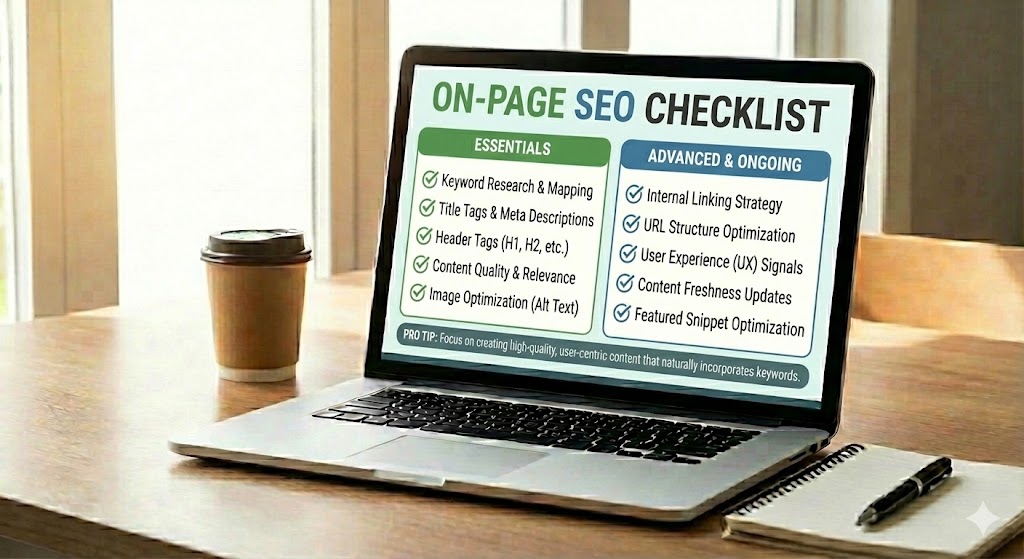
On-page SEO is the process of improving the parts of your web page that you can control. It focuses on elements like text, titles, links, images, and code. When you follow a clear On-Page SEO Checklist, you help search engines understand your page and help users find what they need more easily.
On-page SEO matters because search engines, like any information retrieval system, try to match each search with the most useful and clear page. Well-optimized pages are easier for search engines to read and index, which can improve your chance to rank higher. At the same time, good on-page work creates a better user experience with simple language, logical structure, and fast, easy-to-use pages.
This introduction guides beginners through the main building blocks of on-page SEO. You will learn how to create high-quality content, use keywords in a natural way, set up clean titles and URLs, and improve images and layout. By checking each item step by step, you can build pages that are both search-engine friendly and comfortable for real people to read and use.
On-Page SEO Checklist
Before diving into each element in detail, it helps to see how they work together on a single page. Think of this checklist as a quick overview you can run through every time you publish or update content.
Imagine your page as a small shop on a long street. This checklist helps you arrange everything so both people and search engines can quickly see what you offer and why it matters. Use the items below as a simple, repeatable routine each time you publish or update a page.
- Define search intent: write to solve one clear problem or question.
- Use a primary keyword in the title, first paragraph, and one subheading, but keep it natural.
- Keep one H1 per page, then organize ideas with H2–H4 in a logical order.
- Write a short, clean URL that describes the topic using hyphens between words.
- Add internal links to related pages using descriptive anchor text.
- Compress images, give them meaningful file names, and add clear alt text.
- Check mobile layout, loading speed, and that buttons and menus are easy to tap.
Understanding On-Page SEO and Why It Matters
Once you know the basic checklist, it is easier to understand why each item exists. This section explains how those actions turn into signals that search engines and users both respond to.
Why do two similar pages get very different results in search? Often, the answer lies in how clearly each page sends signals about its topic, quality, and usefulness. Those signals are exactly what a strong On-Page SEO Checklist helps you control.
At its core, on-page work is about giving search engines and people the same thing: well-structured, easy-to-understand pages. When HTML tags, text, and media all point to one clear idea, crawlers can classify your page faster, and visitors can decide in seconds if it helps them.
- Search engines use on-page signals to judge topic relevance and basic content quality.
- Users react to readability, layout, and speed, which also affect engagement metrics.
Because of this, on-page optimization sits at the meeting point of technical clarity and human-friendly design, making every checklist item a small but measurable ranking and usability advantage.
Content Quality Checklist for Strong Pages
After understanding the role of signals, the next step is to strengthen the most important one: your content. High-quality writing is the foundation that makes all other on-page improvements truly effective.
When a visitor lands on your page, they decide in a few seconds whether to stay or leave. That decision depends less on tricks and more on clear, helpful information that feels worth their time.
A strong page follows a simple rule: every line should make the topic easier to understand. Use the checks below to keep your content focused, honest, and useful.
First, make sure your text directly answers the main question behind the search. Remove side notes that do not help the reader reach a clear solution. Every section should support one focused topic instead of jumping between many ideas.
- Check that the page solves one main problem from start to finish.
- Use simple words and short sentences so readers of all levels can follow.
- Add real examples, steps, or numbers to make advice practical, not vague.
To build trust, keep your writing original and trustworthy. Do not copy text from other sites; instead, explain ideas in your own way and add small insights from your experience or data. This helps both readers and search engines see your page as a unique source worth showing.
Keyword Usage Checklist in the On-Page SEO Checklist
With strong content in place, the next focus is on how you signal its topic through keywords. Careful keyword use helps connect your useful content with the exact searches it should answer.
Ever read a page that repeats the same word so often it feels robotic? Smart optimization avoids that problem by using clear, natural language while still giving search engines strong signals about your topic.
Think of your terms as a map: they show both users and crawlers where they are and what they will learn. Use the checks below to guide how you place and balance those words on every page.
- Choose one primary keyword that best matches the main question or problem the page solves.
- Place that primary keyword early, ideally in the first 100 words, in a way that reads smoothly.
- Add related phrases and synonyms so the text sounds natural and covers different ways people search.
- Avoid keyword stuffing; if a line sounds strange when read out loud, rewrite it in simple terms.
- Check density lightly (for example, a few mentions across the page) instead of chasing a fixed percentage.
- Use key terms in strategic spots like headings, image alt text, and anchor text, but only when they fit the meaning.
As Joost de Valk notes, “good keyword usage is about clarity, not repetition”, reminding writers to focus on helpful, readable content first and exact phrases second.
Titles, Meta Descriptions, and Headings Optimization
Once your content and keywords are in good shape, attention shifts to how the page appears and reads at a glance. Titles, snippets, and headings shape both first impressions in search results and how easily people can scan your page.
Have you ever clicked a result just because the line of text in search looked clearer than the others? That small line is usually your title tag and meta description, supported by how you structure headings on the page. Together, they act like a shop sign, window display, and aisle labels for your content.
For titles, aim for one unique, human-readable tag per page that includes your main idea near the start. Keep it concise, usually under about 60 characters, so it does not get cut off. Use wording that promises a clear benefit, such as a result, guide, or answer, and avoid repeating your brand or page name without reason.
Meta descriptions should give a short, honest summary that matches the page content and gently encourages the click. A useful pattern is: who the page is for, what it helps them do, and why it is different. Check that each page has its own description, because duplicate snippets make it harder for users and search engines to tell pages apart.
Inside the page, headings organize your ideas so people can scan quickly and crawlers can read the structure. Use one H1 that states the main topic, then break sections with H2 and smaller points with H3–H4 in a logical order. Sprinkle key phrases only where they fit the meaning, and write headings like mini summaries so a reader could skim them and still grasp the main points.
- One clear title tag per page, including the core topic.
- Meta description that is unique, truthful, and action-focused.
- Heading hierarchy (H1–H4) that follows a clean, nested structure.
- Readable wording that helps users scan, not just search bots.
Technical On-Page SEO Checklist (URLs, Images, Internal Links)
After shaping how your page reads and appears, it is time to refine the quieter technical details. These elements may seem small, but they strongly influence how easily both users and crawlers move through your site.
Have you ever fixed a tiny detail on a page and seen traffic improve later? Many of those “tiny” wins come from quiet technical choices: how you name a link, save a picture, or shape a web address. These details send strong signals to crawlers while also making pages easier for people to use.
A clean URL structure helps both users and bots guess what a page is about before they click. Keep addresses short, descriptive, and stable over time: use lowercase letters, hyphen-separated words, and remove extra numbers or tracking parameters where you can. If you must change a URL, set a 301 redirect from the old path so visitors and search engines do not hit dead ends.
Behind every graphic, there is another chance to improve clarity. Use optimized file names like blue-running-shoes.jpg instead of random strings, and add alt text that describes the image in plain language. This helps with accessibility, provides crawlers with extra context, and can support image search visibility without requiring additional content writing effort.
Links that connect your pages act like paths through a small digital city. Add internal links from higher-level guides to deeper resources, and use descriptive anchor text such as “on-page SEO checklist for blogs” instead of “click here.” Regularly audit your site for broken links; fixing them preserves link equity and prevents users from leaving in frustration.
- Short, descriptive URLs with hyphens and no clutter.
- Well-named images plus meaningful alt text for context.
- Thoughtful internal linking that guides users and supports crawling.
Page Experience, Engagement, and Common On-Page SEO Mistakes
With the structure and technical basics in place, the final layer is how the page actually feels to use. Experience and engagement turn all your optimization work into real behavior: staying, clicking, and converting.
Have you ever clicked a result, waited a moment, and left because the page felt slow or confusing? That quick choice is part of page experience, and search engines watch it closely. When a site feels smooth and simple, visitors stay longer and interact more.
A strong experience covers several basics: fast loading times, a mobile-friendly layout, and clear navigation that helps people move between sections without getting lost. Simple menus, readable fonts, and enough white space all reduce friction and make content easier to use on small screens.
Engagement grows when each page gently guides visitors to a next step. Add clear calls to action, helpful internal links, and honest headings so people know what they will get if they scroll or click. These small choices lower bounce risk and support better on-page metrics over time.
Many beginners still repeat classic errors: slow pages, tiny tap targets on phones, walls of text, weak titles, and missing meta descriptions. Other common problems include thin content, overused keywords, broken internal links, and ignoring basic accessibility like descriptive alt text. Fixing these issues step by step turns the same content into a cleaner, more reliable experience for both users and crawlers.
Using This On-Page SEO Checklist, Review Frequency, and Related Topics
Once your pages are optimized, the final habit is to keep them that way over time. Regular reviews ensure your checklist becomes an ongoing process instead of a one-time task.
Have you ever finished a page and then wondered, “Did I miss something simple?” A clear On-Page SEO Checklist turns that doubt into a quick routine you can follow before and after publishing.
Use this list as a repeatable quality control step. Before a page goes live, walk through each item: content clarity, keyword use, headings, URLs, images, links, and page experience. After publishing, return to the same checklist to spot gaps once you have data from real visitors.
For most sites, a light review every 3–6 months is enough, plus an extra check whenever you see big ranking drops, major content changes, or new search trends. High-traffic or business-critical pages may need more frequent checks because small gains there can bring a large impact.
To plan future learning and internal links, group nearby subjects around this guide:
- Technical SEO basics (crawling, indexing, XML sitemaps)
- Core Web Vitals and performance tuning
- Schema markup and structured data
- Content strategy and topic clustering
- Link-building fundamentals
- Local SEO optimization
- Analytics and conversion tracking
Bringing Your On-Page SEO Checklist Together
On-page SEO is not about tricks; it is about clear, well-structured pages that help people find and understand the information they need. By following this On-Page SEO Checklist, you combine content quality, smart keyword use, clean code, and smooth page experience into one simple routine.
Each element—content, keywords, titles, meta data, headings, URLs, images, links, formatting, and user signals—acts as a small signal in an information retrieval system. Used together and reviewed regularly, they build a strong, searchable library of content that works better for both rankings and real people.