
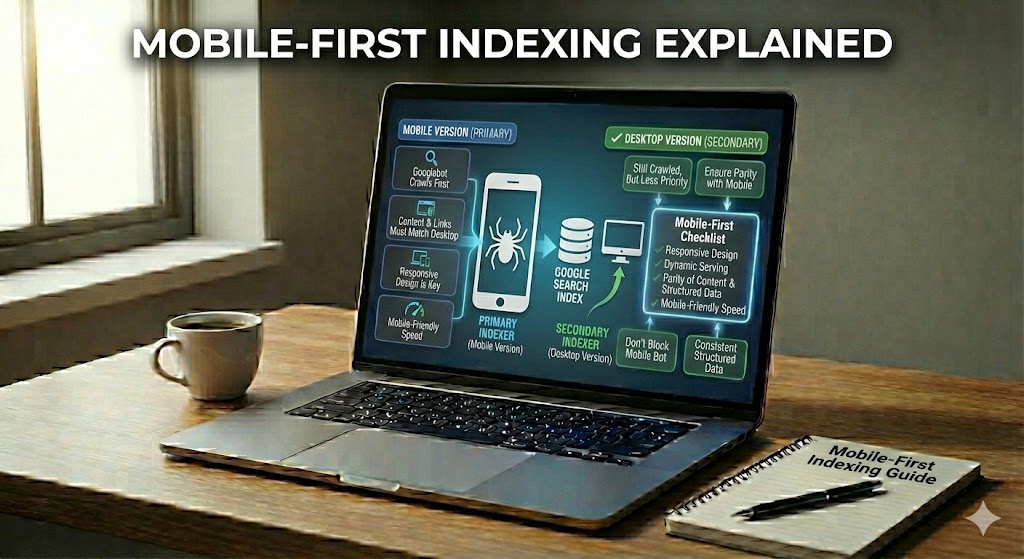
Search engines today look at the mobile version of your website first. This is called mobile-first indexing. It means that the pages people see on their phones are now the main source used to understand, store, and rank your site in the search results.
In the past, search engines used the desktop version of a site to decide what a page was about. Now, because most people search on phones, the mobile content, layout, and speed matter more than ever. If your mobile site is weak, your whole site can suffer in search.
This guide explains mobile-first indexing in simple steps so beginners can follow. You will learn what it is, how it works, and why it is a critical part of SEO today. You will also see common mistakes and easy ways to make your website more mobile-friendly, even if you are not a developer.
Mobile-First Indexing Explained
Before diving into specific techniques, it helps to understand what has really changed. Instead of treating mobile as a smaller copy of your site, search engines now use it as the main reference.
Imagine a librarian who now checks the pocket-sized version of every book before putting it on the shelf. That is similar to what search engines do with your site today. They first look at how your pages work on a phone, then decide how to store and rank them.
With mobile-first indexing, the key idea is simple: the mobile version becomes the main version of your website in the search engine’s index. The desktop view is still seen, but it is secondary and no longer the main source for understanding your pages.
Search engines use this mobile view to read your text, images, links, and structured data. If important details only appear on desktop, they may be ignored or given less value. That is why having the same important content on both mobile and desktop is now critical for basic SEO success.
Introduction to Mobile-First Indexing Explained
Once you know that mobile is now the primary version of your site, the next step is understanding how this affects everyday SEO decisions. Many pages that look strong on desktop can still underperform because the mobile version sends weaker signals.
Have you ever wondered why a page that looks great on a computer can still struggle to appear in search results? One big reason is how search engines now store and evaluate your pages using the version seen on phones. Understanding this shift helps you avoid simple mistakes that can quietly harm your visibility.
In this part, we will look at how mobile-first indexing changes the way your site is judged behind the scenes. Instead of thinking about a “phone site” and a “computer site” as separate, you will learn why they must now work together like one clear, consistent source of truth.
- Core pages (home, product, blog posts) must show the same key text and links on small screens.
- Important elements such as headings, internal links, and structured data should not be hidden only on desktop.
When these pieces match, search engines can trust your content more, which supports better rankings, crawling, and user experience across all devices.
What Is Mobile-First Indexing Explained in Simple Terms?
After seeing why this shift matters, it helps to put the idea into everyday language. Thinking about how you personally browse the web can make the concept much easier to grasp.
Think about how you browse the web when you are not at a desk. You likely tap on pages, scroll with your thumb, and read on a small screen. Search engines now follow this same everyday habit when they try to understand your site.
Mobile-first indexing means that search engines save and judge your site using the version shown on a phone. The content, links, and layout that appear on a mobile screen become the main source for deciding what your pages are about and how they should rank.
To keep things simple: if something is missing, hidden, or hard to use on mobile, search engines treat it as less important, even if it looks perfect on a large desktop screen. This shift pushes every site owner to treat the mobile view as the primary experience, not an afterthought.
Why Search Engines Use Mobile-First Indexing Explained with Key Reasons
Knowing the basic definition is useful, but understanding why search engines made this change helps it feel less confusing. Their goal is to match how real people search and browse every day.
Have you noticed how often people reach for a phone instead of a laptop when they want an answer fast? That simple habit change is at the heart of why search engines shifted their focus. To serve results that match real-life use, they needed an index that reflects what users actually see on small screens.
This change is not random. It is driven by clear patterns in how people search, how they interact with pages, and what keeps them from bouncing away. Understanding these motives helps you see mobile-first indexing as a logical step, not a scary rule.
There are several core reasons behind this shift that affect every site, large or small:
- Most searches now happen on phones, so the mobile version gives the most accurate picture of user behavior.
- Better mobile usability (easy tapping, readable text, simple menus) leads to longer visits and lower bounce rates.
- Consistent content across devices helps search engines avoid confusion and reduces crawling overhead.
- Faster mobile pages support smoother experiences on slower networks, especially in areas with weak connections.
Mobile-First Indexing vs Traditional Desktop Indexing
Once you know why the shift happened, it becomes easier to compare the old and new systems. Seeing them side by side shows exactly what changed in how pages are crawled and stored.
Have you ever compared a website on your phone and on your computer and noticed they do not feel the same? That difference is exactly why search engines changed the way they store and rank pages. Understanding how the old desktop-first system compares to the new mobile-first approach makes the whole process much easier to grasp.
In simple terms, traditional desktop indexing treated the big-screen version as the main copy of your site, while mobile-first indexing means the small-screen version is now the main copy. Both versions still matter, but the order of priority has flipped.
Here is a quick comparison of how they work in practice:
- Desktop indexing: Search engines crawled and stored the desktop page first, then sometimes checked mobile as a secondary view.
- Mobile-first indexing: Crawlers now load the mobile page first and use its content, links, and structured data as the primary reference.
- Result: Any text, images, or internal links missing from mobile are at risk of being treated as less important, even if they appear perfectly on desktop.
Because of this switch, site owners can no longer hide long details, FAQs, or key descriptions only on desktop. To stay safe, keep critical content and navigation available and easy to use on smaller screens, treating the phone layout as the version that truly represents your website to search engines.
How Mobile-First Indexing Affects Your SEO and Website Visibility
Understanding the technical shift is just one part of the picture. It is equally important to see how this change influences rankings, impressions, and user behavior in real searches.
Have you ever fixed a page so it looks perfect on a computer, then felt confused when it still does not rank well? One hidden reason is how search engines now judge and store your pages based mainly on the mobile view. This change quietly shifts which parts of your site get seen, trusted, and shown to users.
Because the phone version is now the primary source, several core areas of SEO are touched at the same time: rankings, how often your pages appear, and how users behave once they click. When these areas work together, your whole site can gain more stable, long‑term visibility.
- Search rankings react to mobile content quality, internal links, and on-page signals.
- Visibility in results depends on whether key text, images, and structured data are present on small screens.
- User signals such as time on page and bounce rate come mostly from mobile visitors now.
If a page is hard to scroll, uses tiny text, or hides important sections on phones, users leave fast. Over time, this poor experience can send negative signals that weaken your overall SEO performance, even if the desktop layout seems flawless.
Common Mobile-First Indexing Problems Beginners Should Avoid
Now that you see how much depends on the mobile version, it is easier to spot where things commonly go wrong. Many issues start with design shortcuts or theme settings that only show up on small screens.
Many site owners work hard on content, then lose traffic for simple reasons they never see on a big screen. Knowing the most frequent mistakes helps you avoid slow, painful drops in visibility before they happen.
The points below focus on practical issues that quietly break the mobile experience and confuse search engines, even when a desktop layout seems fine.
Missing or reduced content on mobile is one of the most damaging problems. Some themes cut long text, hide FAQ sections, or remove internal links on small screens. When this happens, search engines see a weaker page and may rank it lower because crucial information is gone.
Another frequent issue is slow mobile performance. Heavy images, pop‑ups, and unused scripts make pages load badly over mobile networks. Even if the design looks nice, delays can cause users to leave quickly, sending poor engagement signals.
- Large, uncompressed images and videos.
- Too many scripts or tracking codes.
- Auto‑play elements that block interaction.
Poor mobile usability also harms indexing. Tiny buttons, crowded menus, and text that forces users to zoom make pages hard to use. Over time, this leads to higher bounce rates and fewer pages crawled and trusted.
Finally, beginners often forget about structured data and meta tags on the mobile version. If titles, descriptions, or schema are missing or different, search engines receive mixed signals about what the page is really about, which can weaken its presence in results.
How to Prepare and Optimize Your Site for Mobile-First Indexing Explained
Once common problems are clear, you can start focusing on practical fixes. The goal is not a complete redesign, but a mobile experience that carries the same strength as your desktop version.
Think of your site like a small shop on a busy street. If the door is hard to open or the sign is hard to read, people walk past. The same happens on phones when pages are slow, cramped, or cut important parts.
To get ready, you do not need to rebuild everything at once. You just need to make sure the mobile version carries the same core value, loads quickly, and is easy to use with thumbs on a small screen.
Start by checking that all key content appears on both views. Product details, blog text, FAQs, and internal links should not disappear or be shortened only on phones. A simple rule is: if it helps you rank or convert on desktop, it must also be clearly visible on mobile.
Next, improve basic mobile usability. Use readable font sizes, enough space between buttons, and simple, tap‑friendly menus. Many beginners find it helpful to test with this quick list:
- Text is large enough to read without zooming.
- Buttons and links are easy to tap without hitting the wrong one.
- Pages do not require side‑to‑side scrolling.
Speed is another pillar. Lighten pages by compressing large images, removing unused scripts, and limiting heavy pop‑ups. Faster mobile loading not only pleases users but also supports better crawling and indexing.
Finally, keep meta tags and structured data in sync. Titles, descriptions, and key schema should match between desktop and mobile so search engines see one clear story about each page rather than two different versions.
Bringing Your SEO Strategy in Line with Mobile-First Indexing
All of these points come together in your broader SEO strategy. Treating mobile as the starting point rather than a secondary view helps keep every new page aligned with how search engines work today.
Mobile-first indexing means search engines now see your mobile pages as the main version of your site. For beginners, the important lesson is simple: if something matters for rankings, clicks, or sales, it must work well and appear clearly on a phone.
By understanding how mobile-first indexing changes the old desktop-first mindset, you can avoid common traps like missing content, slow pages, and confusing layouts. Instead, you focus on consistent content, fast loading, and easy mobile usability, which all support better visibility in search.
As more people search on their phones, treating mobile as your primary experience is no longer optional; it is a basic part of solid SEO. Keep improving how your site looks, feels, and performs on small screens so search engines can read your pages clearly and users are more likely to stay and engage.