
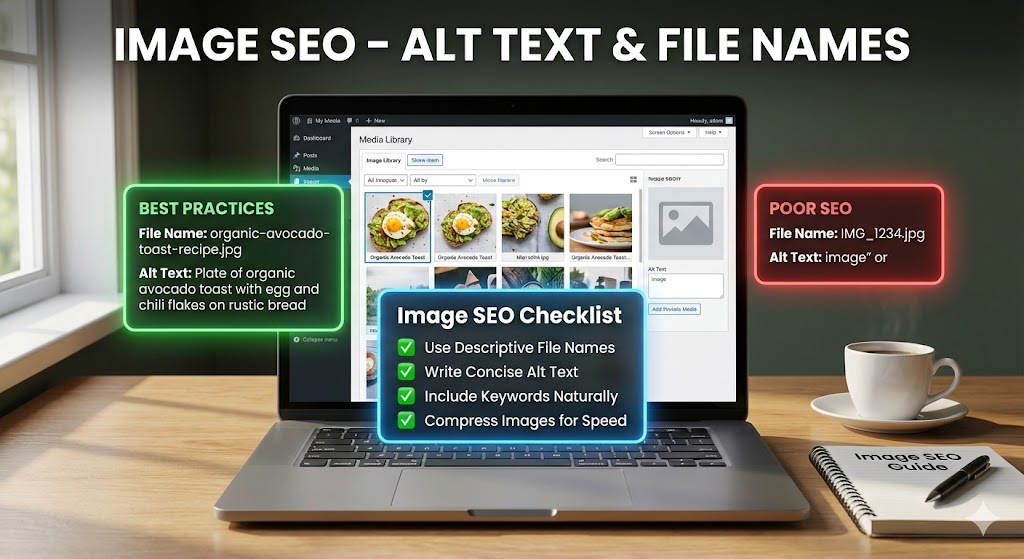
Many websites use images to share ideas, show products, or explain steps, but not all visuals help a page rank well in search results. Image SEO is the process of setting up your pictures so that search engines can find, understand, and show them to users. When done correctly, image SEO can bring more visitors to your site and make your pages easier to use.
Because search engines cannot “see” images like humans, they rely on text to know what a picture is about. This is why alt text and image file names are so important. They work like labels that tell search engines and users what is shown in the image, and clear, accurate labels help your images appear in image search and support your main page content.
Image SEO also matters for people who use screen readers or have slow internet connections. Good alt text and smart file names make your site more accessible and more reliable. By following simple rules, even beginners can learn to optimize images the right way, avoid common mistakes, and improve both user experience and search performance at the same time.
Image SEO – Alt Text & File Names
Well-optimized images often sit behind those search results where the perfect picture appears in seconds. This section shows how to turn each image into a helpful signal for both users and search engines by focusing on its surrounding text.
When you choose smart words for your alt text and file names, you do more than “label a photo.” You connect the image to your topic, your keywords, and your users’ needs. Done right, this simple step can quietly boost visibility, clicks, and accessibility all at once.
To put this into practice, focus on three basic ideas:
- Describe what is really shown, not what you wish were there.
- Use clear, keyword-aware phrases without stuffing.
- Save images with short, descriptive file names that match the content.
Introduction
Finding the right image quickly is much easier when it has a clear label. Search engines face that same problem at scale as they decide which picture best answers a user’s query.
Image SEO is the way you provide those labels in a form computers can read. By adding useful text details around a picture, you help search engines match it with the right search and help people understand it when the image cannot load.
In simple terms, you are teaching machines to “read” your pictures. When you write clear alt text and choose descriptive file names, you turn each image into a small helper that supports your main content and can appear in search results on its own.
What Is Image SEO?
Images that closely match a search result are usually backed by strong text signals, not just good luck. This section explains what those signals are and how they help search engines understand your visuals.
In this context, image SEO is the practice of helping computers understand what a picture shows and why it belongs on a page. Instead of changing the picture itself, you improve the text and data around the image, such as its alt text, file name, and nearby content.
Search engines scan these elements to form a kind of text-based summary of each file. They look at signals like:
- Alt text that explains the visual content.
- File names that use simple, descriptive words.
- Page context such as headings and surrounding paragraphs.
By combining these clues, the algorithm builds an implicit model of the image and decides when it should appear in search or image results, and for which queries.
Understanding Alt Text in Image SEO
Alt text is one of the most visible parts of image SEO for users who cannot see the picture itself. This section covers what it is and why it matters so much for both accessibility and search visibility.
When a picture fails to load, the small line of text that appears in its place is not a random note. That short message is alt text, and it quietly guides both users and search engines. Learning how it works will help you get much more value from every image.
Alt text is a brief description added to the image tag in your HTML. Its main job is to explain what the picture shows so that screen readers, search engines, and users on slow connections can still understand your content.
In practice, good alt text does three things at once: it describes the visual, supports your page topic, and stays short and natural. For example, instead of writing “image123,” you might write “red running shoes on a wooden floor,” which gives a clear, useful clue.
- Helps accessibility for people using assistive technology.
- Improves relevance for image search results.
- Adds context when images cannot be displayed.
Writing SEO-Friendly Alt Text
Strong alt text works like a helpful caption, giving just enough detail to make the image meaningful. In this section, you will see how to keep descriptions useful, concise, and aligned with your content.
To make these short descriptions useful, you need a few simple habits. The goal is to help people first, while giving search engines clear clues at the same time.
Write what you actually see in the picture in plain words. For example, use “boy holding a blue umbrella in the rain” instead of “nice weather gear.” This direct style makes the content easier for screen readers and improves relevance in image results.
Next, add a main keyword only if it fits naturally. You might write “homemade chocolate cake on a white plate” for a recipe page. Avoid repeating the same phrase or stuffing many terms, which can confuse both users and crawlers.
- Keep alt text short (often under 120 characters).
- Skip words like “image of” or “picture of.”
- Leave decorative images empty (alt=””) so screen readers can ignore them.
Alt Text Examples: Good vs Bad
Comparing weak and strong alt text side by side makes it easier to understand what really helps. This section uses simple examples to show how a few words can change how an image is interpreted.
Have you ever wondered why some images show up for very exact searches, while others never appear at all? Often, the reason is simple: one has clear, useful alt text, and the other does not. Looking at real examples makes it easier to see what works and what fails.
In this part, you will compare bad alt text with better versions and learn how a few words can change how search engines and users understand an image.
Example 1: Running shoes on a wooden floor
- Bad: “IMG_4456”
- Bad: “shoes, sport, buy now, cheap, discount”
- Good: “red running shoes on a wooden floor”
The good version gives a clear visual description and supports search intent without stuffing sales terms.
Example 2: Chocolate cake on a plate
- Bad: “food pic”
- Good: “homemade chocolate cake on a white plate”
Here, the better line adds specific details that help both accessibility and relevance in results.
Image File Names and Their Role in Image SEO
Alt text is not the only text signal search engines use; file names also play a quiet but important role. This section shows how simple naming habits can support both search and organization.
Have you ever downloaded a photo called IMG_0001 and had no idea what it was later? Search engines face the same problem when image files keep their default names. A clear, descriptive file name works like a label on a storage box: it tells both you and search engines what is inside before opening it.
In HTML and on your computer, the file name is one of the first clues search engines read. While alt text explains the image inside the page, the name of the file gives an early hint that can support ranking in image search results and make your media library easier to manage over time.
To make the most of this small but powerful detail, follow a few simple habits when saving pictures:
- Use short, descriptive words that match what the picture shows (for example, red-running-shoes.jpg).
- Separate words with hyphens, not spaces or underscores, so each term is easy to read.
- Avoid generic defaults like IMG_4456.jpg, which give search engines no helpful context.
Image SEO Mistakes to Avoid
Even with good intentions, a few recurring mistakes can limit the impact of your images. This section highlights common pitfalls so you can correct them before they hurt performance.
Beginners often repeat the same patterns: they skip text, use bad labels, or overload images with the wrong kind of details. By spotting these issues early, you protect your site from confusion, wasted crawl time, and lost visibility.
- Leaving alt text empty on meaningful images, so screen readers and crawlers get no description.
- Stuffing keywords into alt text like a tag list instead of writing a clear sentence.
- Keeping default file names such as IMG_001.jpg that say nothing about the picture.
- Using huge image files that slow pages and hurt rankings, even if the text is perfect.
- Repeating the same alt text for different pictures that show different things.
- Describing decoration instead of leaving it with empty alt text (alt=””).
- Ignoring context by adding images that do not match the nearby heading or paragraph.
Turning Every Image Into a Search-Friendly Asset
Strong image SEO comes from clear, honest descriptions rather than complex tricks. By applying consistent habits to each upload, you gradually turn every picture into a small but meaningful asset.
Image SEO is not about tricks; it is about giving clear, honest information so that both people and search engines can understand your pictures. By focusing on strong alt text and descriptive file names, you turn each image from a silent decoration into a useful part of your page that can support rankings, clicks, and accessibility.
Treat every new upload as a chance to apply these simple habits: clear alt text, smart file naming, and images that fit the context of the page. Over time, these small, consistent steps can quietly improve your overall Image SEO and make your content easier for both users and crawlers to “see.”