
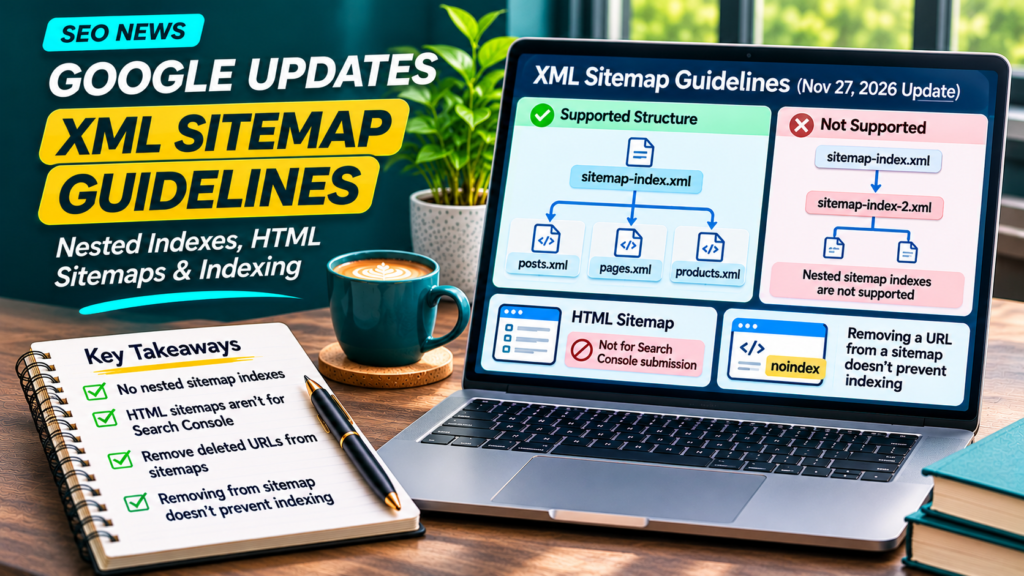
Google updated its official XML sitemap documentation on November 27, 2026, bringing important technical guidance from older Search Central blog posts into its current documentation.
The update clarifies several sitemap practices that website owners and SEO professionals should understand, including nested sitemap index files, HTML sitemap submissions, sitemap removal and indexing, and gzip compression.
These clarifications are particularly relevant for large websites, ecommerce stores, publishers, WordPress websites and technical SEO professionals.
In this guide, we will explain what Google changed, how sitemap structures should work and what website owners should check.
What Did Google Change in Its XML Sitemap Documentation?
Google’s November 27 documentation update transferred still-relevant guidance from its older 2005 blog posts into its current sitemap documentation.
Two examples specifically mentioned by Google are:
- Nested sitemap index files are not supported.
- HTML sitemaps cannot be submitted in Google Search Console.
Additional clarification is available in Google’s sitemap documentation about removing URLs from sitemaps, gzip compression and sitemap structure.
Important: This is a documentation clarification, not an announcement of a new Google ranking algorithm or a change that automatically penalises websites using older sitemap structures.
1. Google Says Nested Sitemap Index Files Are Not Supported
A sitemap index file is used to list multiple individual sitemap files. It is useful when a website contains thousands of URLs and needs to organise them into separate sitemap files.
However, Google clarifies that a sitemap index file cannot point to another sitemap index file.
What is a nested sitemap index?
Consider this structure:
sitemap-index.xml
  ├── posts-sitemap.xml
  ├── pages-sitemap.xml
  └── category-index.xml
        ├── category-1.xml
        └── category-2.xml
The problem is that category-index.xml is itself another sitemap index file. Google does not support this nested index structure.
What is the correct sitemap structure?
sitemap-index.xml
  ├── posts-sitemap.xml
  ├── pages-sitemap.xml
  ├── products-sitemap.xml
  ├── categories-sitemap.xml
  └── images-sitemap.xml
Each listed file should be an individual sitemap, not another sitemap index.
Example of a sitemap index
<?xml version="1.0" encoding="UTF-8"?>
<sitemapindex xmlns="http://www.sitemaps.org/schemas/sitemap/0.9">
  <sitemap>
    <loc>https://example.com/posts-sitemap.xml</loc>
    <lastmod>2026-11-27</lastmod>
  </sitemap>
  <sitemap>
    <loc>https://example.com/pages-sitemap.xml</loc>
    <lastmod>2026-11-27</lastmod>
  </sitemap>
  <sitemap>
    <loc>https://example.com/products-sitemap.xml</loc>
    <lastmod>2026-11-27</lastmod>
  </sitemap>
</sitemapindex>
This example contains an index that directly references individual sitemap files. See Google’s guide to managing large sitemaps with sitemap index files.
2. HTML Sitemaps Cannot Be Submitted as XML Sitemaps in Search Console
Many websites maintain two different types of sitemap: an XML sitemap for search engines and an HTML sitemap for website visitors. Both can be useful, but they serve different purposes.
What is an HTML sitemap?
An HTML sitemap is a normal website page containing links to important pages. For example, https://example.com/sitemap/ might contain links to the home page, about page, services, products, blog categories and contact page.
An HTML sitemap can help visitors navigate a website and provide additional internal links. However, Google clarifies that an HTML sitemap page is not a sitemap format that can be submitted in Google Search Console.
| Feature | XML Sitemap | HTML Sitemap |
|---|---|---|
| Main purpose | Search engine discovery | Website navigation |
| Format | XML | HTML |
| Submitted in Search Console | Yes | No |
| Human-friendly | Not usually | Yes |
| Useful for large websites | Yes | Can be useful |
Recommendation: Maintain an XML sitemap for search engine discovery and an HTML sitemap when it provides genuine navigation value to visitors. Do not confuse the two formats.
3. Removing a URL From Your Sitemap Does Not Stop Google Indexing It
An XML sitemap helps Google discover URLs. However, it does not control whether a URL can appear in Google Search.
Imagine you have this page: https://example.com/old-product/. You remove it from your XML sitemap. Does that guarantee Google will stop indexing it? No. Google may still discover the URL through internal links, external backlinks, previously discovered URLs or other crawlable references.
How can you prevent a page from appearing in Google Search?
If you want a page to be excluded from search results, use an appropriate indexing control. For example, a page can contain:
<meta name="robots" content="noindex">Google must be able to crawl the page to see this instruction. Therefore, do not block the page in robots.txt if your intention is for Google to discover and process its noindex directive.
| Action | What it does |
|---|---|
| Remove URL from XML sitemap | Stops listing the URL in that sitemap |
| Add noindex directive | Requests that search engines exclude the page from search results |
| Block URL in robots.txt | Prevents crawling, but does not guarantee removal from search |
| Return 404 or 410 | Indicates that the requested resource is unavailable |
These actions are not interchangeable. If you want to understand how Google handles missing pages, read our article: Google Updates 404 Error Guidelines: 7 Technical SEO Mistakes Website Owners Should Avoid.
4. Google Clarifies Sitemap File Size and Gzip Compression
Google’s sitemap documentation explains that website owners can compress XML sitemap files using gzip to reduce bandwidth and file transfer size.
For example, sitemap.xml can be compressed into sitemap.xml.gz.
However, Google’s 50 MB sitemap size limit applies to the uncompressed file.
| Requirement | Limit |
|---|---|
| Maximum uncompressed sitemap size | 50 MB |
| Maximum URLs in one sitemap | 50,000 |
| Maximum sitemap entries in one index | 50,000 |
| Gzip compression | Supported |
If your sitemap contains more than 50,000 URLs or exceeds 50 MB uncompressed, split it into multiple sitemap files. You can then list those individual files in a sitemap index.
sitemap-index.xml
  ├── products-1.xml.gz
  ├── products-2.xml.gz
  ├── products-3.xml.gz
  ├── categories.xml.gz
  └── pages.xml.gz
This approach helps organise large websites while keeping each sitemap within Google’s limits.
5. How to Check Whether Your Website Uses Nested Sitemap Indexes
Website owners should review their existing sitemap structure rather than assuming their CMS automatically generates a compliant setup.
- Open your sitemap index. Visit your main sitemap URL, such as
https://example.com/sitemap_index.xml. WordPress websites using SEO plugins often generate a sitemap index automatically. - Review the listed sitemap URLs. Look for files such as
post-sitemap.xml,page-sitemap.xml,product-sitemap.xmlandcategory-sitemap.xml. - Open each listed sitemap. Check whether each file contains individual URL entries or another sitemap index. An individual sitemap generally uses
<urlset>; an index uses<sitemapindex>. - Correct the structure. Make the main index point directly to individual sitemap files, and keep each sitemap within Google’s limits.
- Review Google Search Console. Check the Sitemaps report for submitted sitemap URLs, last read date, processing status, discovered URLs and reported errors.
After correcting the sitemap, submit the updated sitemap index if necessary.
6. How Should WordPress Website Owners Check Their Sitemap?
WordPress websites often generate XML sitemaps automatically through SEO plugins or WordPress core. Common options include Yoast SEO, Rank Math, All in One SEO and WordPress core sitemap functionality. The exact sitemap structure depends on the plugin and website configuration.
WordPress sitemap audit checklist
- Open your website’s sitemap index.
- Identify all child sitemap files.
- Confirm that the index points directly to individual sitemaps.
- Check that no child file is another sitemap index.
- Review whether deleted pages remain in the sitemap.
- Check whether important canonical URLs are included.
- Confirm that sitemap files are accessible.
- Check the sitemap submission in Google Search Console.
For a more complete technical review, use our Technical SEO Checklist. You can also use our XML Sitemap Generator and Sitemap Link Extractor when reviewing and working with sitemap URLs.
7. Common XML Sitemap Mistakes to Avoid
| Mistake | Recommended action |
|---|---|
| Nested sitemap indexes | Make the main index point directly to individual sitemaps |
| Submitting HTML sitemaps in Search Console | Submit a supported sitemap format |
| Keeping permanently deleted URLs | Remove them from XML sitemaps |
| Including non-canonical URLs | Review canonical URL selection |
| Exceeding sitemap limits | Split into smaller sitemap files |
| Incorrect lastmod dates | Use accurate significant modification dates |
| Including redirected URLs | Prefer the final canonical destination |
| Including URLs blocked from crawling | Review crawl accessibility and sitemap quality |
Google generally uses accurate lastmod information when scheduling crawling. Do not update lastmod simply because the copyright year or another insignificant element changed.
Technical SEO Checklist After Google’s Sitemap Documentation Update
- Open the main XML sitemap index.
- Check whether nested sitemap indexes exist.
- Confirm that the index references individual sitemap files.
- Separate HTML sitemap pages from XML sitemap submissions.
- Remove permanently deleted URLs.
- Review canonical URLs in the sitemap.
- Check the 50 MB uncompressed size limit.
- Check the 50,000 URL limit per sitemap.
- Use gzip compression where appropriate.
- Review lastmod accuracy.
- Check sitemap accessibility.
- Review sitemap processing in Google Search Console.
- Use noindex when a crawlable page should be excluded from search.
- Monitor important URLs after making changes.
Frequently Asked Questions
Did Google introduce a new XML sitemap format in November 2026?
No. Google moved existing guidance from older blog posts into its current documentation. The update clarifies supported sitemap structures and practices rather than introducing a new sitemap format.
Does Google support nested sitemap index files?
No. Google states that sitemap index files can list individual sitemaps, but nested sitemap index files are not supported.
Can I submit an HTML sitemap to Google Search Console?
No. An HTML sitemap is a normal web page that can help visitors navigate a website. It is not a supported sitemap format for submission in Search Console.
Does removing a URL from an XML sitemap remove it from Google?
No. Google can still discover a URL through internal links, external links or other references. Use an appropriate noindex directive when a crawlable page should be excluded from search results.
What is the maximum XML sitemap size?
A single sitemap can contain up to 50,000 URLs and be up to 50 MB when uncompressed. These limits apply across supported sitemap formats.
Can I use gzip compression for XML sitemaps?
Yes. Google supports gzip-compressed sitemap files. The 50 MB limit applies to the uncompressed file.
Do WordPress SEO plugins automatically create compliant sitemaps?
Many WordPress SEO plugins generate sitemap indexes and individual sitemap files automatically. However, website owners should still review the generated structure and configuration.
Final Thoughts
Google’s November 27, 2026 XML sitemap documentation update is a useful reminder that sitemap configuration needs to be technically correct.
The most important lessons are: do not use nested sitemap index files; do not submit HTML sitemap pages as XML sitemaps in Search Console; do not assume removing a URL from a sitemap prevents indexing; keep sitemap files within Google’s size and URL limits; and maintain accurate, accessible and useful sitemap entries.
A sitemap is a discovery tool, not an indexing guarantee or an indexing control. Website owners should review their existing sitemap structure and correct any problems rather than rebuilding everything unnecessarily.
Official Google Resources
- Google Search Central: Latest Documentation Updates
- Google: Build and Submit a Sitemap
- Google: Manage Your Sitemaps With Sitemap Index Files
- Google: Learn About Sitemaps
- Google Search Console Help
Last updated: November 28, 2026.