
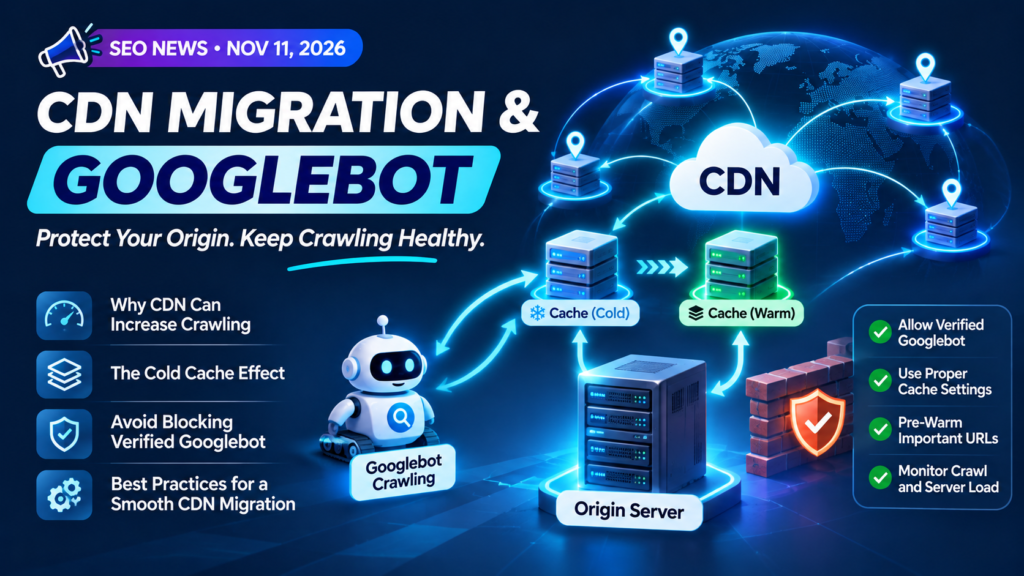
Moving a website behind a Content Delivery Network (CDN) can improve loading speed and help protect the origin server. However, Google says the transition can temporarily create an unexpected problem: Googlebot requests may increase while the CDN cache is still cold, sending more requests back to the origin server.
In a Google Search Central article published on November 11, 2026, Google explains why this happens and how site owners can migrate without overwhelming their infrastructure or accidentally blocking legitimate search crawlers.
Why can a CDN migration increase Googlebot traffic?
Google’s crawling systems monitor how quickly and consistently a host responds. When responses are slow, Google may reduce its crawling rate to avoid putting unnecessary pressure on the server. When responses become faster and remain stable, Google’s crawl capacity limit (also called hostload) can gradually increase, provided there is enough crawl demand.
After DNS is pointed to a fast CDN, response times at the edge can improve. Google’s systems may then see the host as capable of handling more requests and increase crawling activity over time. This does not mean every CDN migration will cause a spike; the result depends on crawl demand, server health and the CDN setup.
The cold-cache problem: why the origin server still receives requests
A newly configured CDN often starts with an empty or partially populated cache. This is known as a cold cache. When a request reaches an edge location for a URL that is not cached, the CDN must fetch that response from the origin server. This is a cache miss.
Once the CDN has stored a cacheable response, later requests for the same URL can be served from the edge as cache hits. But crawlers systematically explore a site’s URL inventory, not just its most popular pages. During the initial period, requests for many different uncached URLs can therefore travel back to the origin.
This creates a temporary mismatch: the CDN may make responses faster, which can allow more crawling, while its cache is not yet populated enough to absorb all those requests. The origin server can remain under pressure until cache coverage improves.
Why blanket bot protection can block Googlebot
When administrators notice a sudden increase in automated requests, they may enable strict bot protection or firewall challenges. If those rules treat all automated clients equally, they can also challenge legitimate search crawlers.
For example, a CAPTCHA or interstitial challenge can prevent Googlebot from fetching the actual page. If verified crawlers repeatedly receive challenge pages or blocked responses, Google may reduce crawling. If the restriction continues, affected pages or other content that relies on Google’s crawling systems may become less visible or drop out of Search.
Google’s recommendations for a safer CDN migration
1. Allow verified Google crawlers
Review CDN and Web Application Firewall (WAF) rules before enabling bot protection. Use your provider’s verified-bot controls where available, and verify crawler identity using Google’s published methods and IP ranges. Do not trust a request simply because its user-agent says Googlebot. Keep protection against unwanted automation, but avoid blanket rules that challenge verified search crawlers.
Google’s verification guide: Verify Googlebot and other Google crawlers.
2. Pre-warm important CDN cache URLs
Before routing all traffic through the new CDN, fetch important URLs through the CDN at a controlled pace. Prioritise high-traffic pages, key landing pages, frequently crawled URLs and pages expected to receive seasonal or promotional traffic. This helps populate edge caches before the migration receives its full traffic load.
3. Use temporary 429 or 503 responses only when necessary
If crawling is still putting critical pressure on the origin while caches warm up, Google says temporary rate limiting may help. A 429 Too Many Requests response or a 503 Service Unavailable response can signal that the server needs a short break.
Google describes this as an emergency measure for a short period—typically a few hours or one to two days at most—not a permanent way to control crawling. Review Google’s guidance on reducing Googlebot crawl rate before implementing it.
CDN migration technical SEO checklist
- Test the CDN configuration and origin connection before changing DNS.
- Confirm HTTPS certificates and redirects work correctly.
- Review cache rules, cache keys, TTLs and bypass conditions.
- Pre-warm important and frequently crawled URLs at a controlled pace.
- Allow verified Google crawlers through CDN and WAF protections.
- Check that robots.txt, XML sitemaps and canonical URLs remain accessible and correct.
- Monitor origin response times, CPU, bandwidth and request volume.
- Compare CDN cache hits and cache misses during the transition.
- Review server logs and Googlebot requests for unexpected errors or challenges.
- Use temporary 429 or 503 responses only if critical load requires an emergency brake.
What should SEO teams monitor after a CDN migration?
SEO teams should work with developers and hosting administrators during the migration. Monitor Googlebot requests, origin-server response times, CDN cache-hit ratios, HTTP status codes and Search Console crawl or indexing signals. A faster page experience for visitors is valuable, but it should not come at the cost of crawler access or server stability.
For a broader site health review, see our technical SEO checklist.
Final thoughts
Google’s guidance highlights an important part of technical SEO: infrastructure changes can affect crawling behaviour. A CDN can improve delivery, but a cold cache may send many first-time requests to the origin. At the same time, aggressive bot protection can accidentally block the crawlers a website needs.
The key takeaway: Plan the migration, pre-warm important cache URLs, allow verified Google crawlers and monitor server health. Treat temporary crawl-rate controls as an emergency measure—not a permanent configuration.
Official Google resources
- Moving to a CDN without overwhelming your origin (or blocking Googlebot) — Google Search Central, November 11, 2026.
- Verify Googlebot and other Google crawlers.
- Reduce Googlebot crawl rate.
- Large site owner’s guide to managing crawl budget.