
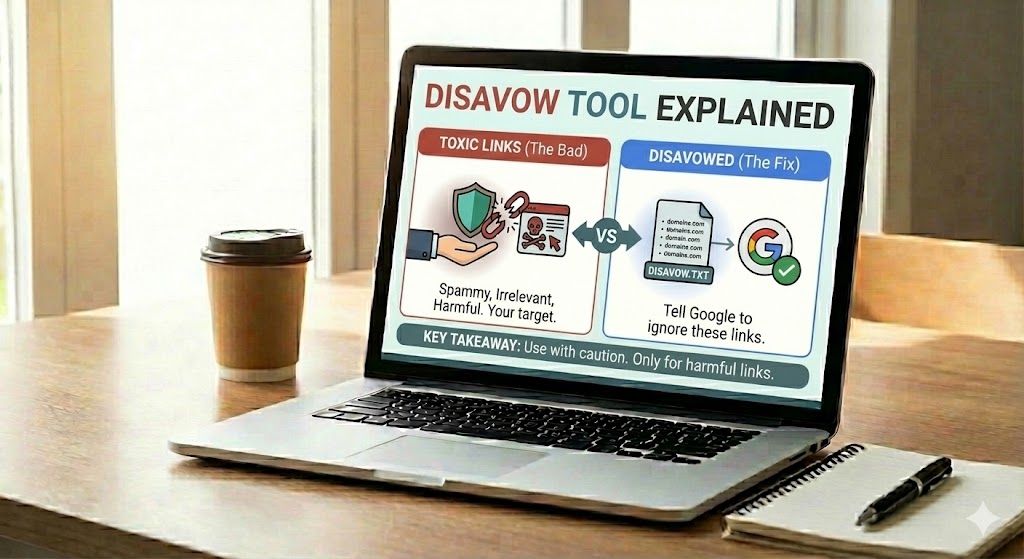
The world of SEO can feel confusing, especially when you first hear about things like “bad links” and “toxic backlinks.” The Disavow Tool is a way to tell search engines, in a clear and safe manner, to ignore certain links that point to your website so they do not hurt your rankings.
This tool exists because not all links are helpful. Some links come from spammy sites, link farms, or automated tools. These can look unnatural and may break search engine rules, also called webmaster guidelines. When this happens, your site can lose trust in search results, even if you did not create those links yourself.
For beginner SEO users, the Disavow Tool is a powerful but risky tool. Used correctly, it can help protect your site from harmful backlinks. Used in the wrong way, it can make search engines ignore good links that were helping you. This guide explains, step by step, what the Disavow Tool is, when to use it, when to avoid it, and how to handle it with care so you keep your website safe and healthy in search results.
Disavow Tool Explained
Before you decide whether to disavow any backlinks, it helps to understand what the tool actually does. This section walks through how the Disavow Tool works behind the scenes and why search engines treat it as a careful signal rather than a simple on/off switch.
By seeing how links are processed, ignored, or still counted, you will be better prepared to use the tool in a way that protects your site instead of accidentally weakening it.
The Disavow Tool is a special feature inside search engine webmaster panels that lets you submit a file listing URLs or domains whose backlinks you want ignored. In simple terms, it says: “Do not count links from these places when you judge my site.” This does not delete the links from the web; it only changes how they are treated in ranking systems.
From a technical point of view, search engines treat disavowed links like links with no value. They usually stop passing link equity or trust from the listed pages and domains. Over time, this helps separate your site from spammy patterns that might have triggered a penalty or lowered trust.
- Important: Disavowing is a hint, not an absolute command; search engines choose how to apply it.
- Changes are not instant. Crawling and reprocessing can take weeks or even months.
- Once a link is ignored, it usually stops helping as well as hurting, so be sure it is really toxic.
Introduction to the Disavow Tool Explained
Once you understand the basic definition of the Disavow Tool, the next step is to see how it fits into your overall SEO strategy. This section connects the idea of “ignoring links” with your broader backlink profile and long‑term site health.
By looking at context, not just individual links, you can decide when disavowing is truly necessary and when other tactics should come first.
Imagine someone pointing at your site and shouting bad things that are not true. Over time, those shouts can shape how others see you. In a similar way, low‑quality backlinks can slowly shape how search engines judge your pages.
This is where a deeper look at the Disavow Tool becomes useful. Instead of just knowing that it “ignores links,” you need to understand how it changes your backlink profile, how it fits into manual actions, and why it should never replace good link‑building and off‑page best practices.
Used wisely, it supports a larger cleanup strategy that may also include contacting webmasters, improving content quality, and reviewing anchor text patterns. Used carelessly, it can cut off natural links that were quietly helping your authority.
- Think of every disavowed domain as a permanent vote removed from your site.
- Review and update your disavow file when major link audits reveal new spam clusters.
What Is the Disavow Tool and How Does It Work?
After seeing the bigger picture, it is helpful to zoom back into the mechanics of the tool itself. This part explains how you actually submit links, how search engines process them, and why results take time to appear.
Knowing the basic workflow makes it easier to set realistic expectations and avoid panicking when changes do not show up immediately.
Think of your backlink profile like a school report card made from other sites’ opinions. Some “grades” are fair, but others come from spammy places that should not count against you at all.
The Disavow Tool is a way to tell search engines to treat certain backlinks as if they are worth nothing. You upload a small text file listing specific URLs or whole domains, and search engines use this as a strong hint to ignore those links when calculating your authority.
Behind the scenes, the system first needs to re‑crawl the pages that link to you, then match them with the entries in your disavow file. Only after this processing do those links stop passing link equity. This means changes are slow and gradual, not instant fixes.
- Use clear, one‑per‑line entries like domain:spam-example.com.
- Keep a backup copy of every version of your disavow file for safety.
Disavow Tool Explained – Why It Matters for Your SEO
Understanding how the Disavow Tool works naturally leads to the question: Why does it matter for rankings at all? This section links the tool directly to SEO performance, showing how link quality can lift or limit your visibility.
By connecting disavow decisions with algorithm behavior, you can see why this tool should support, not replace, solid SEO fundamentals.
Have you ever wondered why two similar sites can rank very differently, even when their content looks almost the same? Often, the hidden difference lies in the quality and trustworthiness of their backlinks, not just in how many links they have.
This is where the Disavow Tool becomes strategically important. Instead of blindly accepting every “vote” from other websites, you can ask search engines to ignore links that look manipulative, spammy, or unsafe, protecting the long‑term strength of your domain.
For SEO, this matters because modern algorithms focus heavily on link patterns, anchor text balance, and linking site reputation. A few highly toxic domains can drag down an otherwise healthy profile, especially after a manual action or algorithmic filter. By carefully disavowing, you help search engines separate your genuine authority from legacy link schemes, negative SEO, or old low‑quality campaigns.
Used as part of a wider link audit and cleanup plan—alongside outreach, better content, and natural link building—the tool acts like a safety valve. It does not grow your rankings by itself, but it can remove hidden brakes that are quietly limiting your visibility, trust, and future growth.
When Should You Use the Disavow Tool?
Knowing that the Disavow Tool can affect your SEO, the next challenge is timing. This section focuses on the specific situations where using it is not only safe but often necessary.
By recognizing these signs, you can treat the tool as a targeted solution for real problems instead of something you reach for out of habit.
Not every strange or unwanted backlink is a problem. The Disavow Tool is meant for serious link issues, not for routine, everyday SEO work, so it should only be used in specific, higher‑risk situations.
You normally consider it when other methods, like manual link removal or simple ignoring, are not enough. In these cases, you are using the tool as a last layer of protection rather than a quick fix.
- Manual actions for unnatural links: If you receive a message about unnatural inbound links, a careful disavow file can support your cleanup and reconsideration request.
- Large clusters of toxic backlinks: When there are many spammy domains (often from link farms or automated tools) that you cannot remove, disavowing helps reduce their impact.
- Clear history of link schemes: Old paid links, blog networks, or doorway schemes that break guidelines and cannot be cleaned manually are strong candidates.
For beginners, the key rule is caution: only use the Disavow Tool when there is strong evidence of real harm, and preferably after talking with a more experienced SEO specialist.
When You Should Avoid Using the Disavow Tool
Just as important as knowing when to act is knowing when to leave things alone. This part explains the scenarios where disavowing links is more likely to cause damage than deliver benefits.
By holding back in these cases, you allow search engines to do their own spam filtering and keep your site’s natural strength intact.
Have you ever felt the urge to “clean everything” in your backlink report just because it looks messy or strange? That impulse is normal, but with the Disavow Tool it can quietly remove helpful signals that were supporting your rankings. Knowing when to stay away from this tool is just as important as knowing when to use it.
You should generally avoid disavowing links when your site has no manual action, no clear drop connected to link issues, and only a small number of odd backlinks that look random but not clearly manipulative. Modern algorithms are already good at ignoring most low‑value spam, so extra “cleanup” often adds risk without real benefit.
- Do not use it as a routine “SEO maintenance” step or monthly habit.
- Avoid disavowing natural mentions just because they come from low‑authority or unfamiliar sites.
- Skip the tool if you feel unsure how to judge link quality; focus instead on creating better content and earning new, organic backlinks.
Disavow Tool Explained – Common Mistakes Beginners Make
Even when you know the right and wrong times to use the Disavow Tool, execution can still go wrong. This section highlights frequent beginner errors so you can recognize and avoid them in your own work.
By learning from these patterns, you keep your cleanup efforts focused on genuinely risky links instead of accidentally weakening your backlink profile.
Have you ever tried to “fix everything at once” and later realized you removed things that were actually helping you? That same rush can easily happen with the Disavow Tool, and the damage can quietly hold back your rankings for a long time.
New SEO users often mean well but misjudge which links are truly harmful. By understanding the most common errors, you can avoid costly setbacks and keep your backlink cleanup focused on real threats instead of harmless noise.
- Adding every low‑authority link to the disavow file just because it looks small or unfamiliar.
- Disavowing entire domains instead of specific URLs, without checking if some pages are actually good.
- Uploading a file without backups, so earlier clean versions cannot be restored if you make a mistake.
- Treating the tool as a monthly routine task instead of a rare response to serious link problems.
- Mixing syntax formats (wrong use of domain: lines) and assuming search engines will understand anyway.
- Using disavow as a shortcut instead of first trying manual link removal or outreach.
- Expecting instant ranking boosts and then over‑disavowing when nothing changes after a few days.
Who Should Use the Disavow Tool and Related SEO Topics
By now, it should be clearer that the Disavow Tool is not a one‑size‑fits‑all solution. This section outlines who is best suited to use it and which related SEO areas beginners should explore next.
Understanding your own role and experience level helps you decide whether to handle disavow work yourself or seek specialist support.
Have you ever looked at a backlink report and thought, “This looks dangerous, but I am not sure what to do”? That feeling is a clue that the Disavow Tool is not meant for everyone, but for specific types of site owners and situations.
The people who should use it most are those dealing with serious, proven link problems. Typical examples include sites hit by a manual action for unnatural links, domains with a long past of paid links or link networks, or brands attacked by large‑scale negative SEO campaigns. In these cases, the tool becomes part of a wider risk‑management strategy, not a casual tweak.
- Experienced SEOs running full link audits and handling penalties.
- Businesses buying old domains that may carry a legacy of spam.
- Agencies cleaning up after past black‑hat link building contracts.
To keep learning in a structured way, beginners should also study related topics such as link earning tactics, anchor text analysis, penalty recovery, crawl budgets, off‑page trust signals, link risk tools, outreach best practices, and the basics of PageRank flow. These areas work together with careful disavow use to build a safer, stronger SEO foundation.
Using the Disavow Tool as a Careful, Last‑Resort SEO Strategy
All of these pieces come together in how you treat the Disavow Tool over the long term. This final section reinforces its role as a precision, last‑resort option rather than a routine button to press.
By approaching it with patience and documentation, you can use disavow decisions to support a cleaner backlink profile without sacrificing valuable authority.
The Disavow Tool is best seen as a precision safety tool, not a routine SEO shortcut. It exists to help you separate your site from truly harmful backlink patterns, especially when there are clear signs of manual actions, legacy link schemes, or large spam clusters that you cannot clean up by normal outreach.
For beginner SEO users, the most important lesson is balance. You now know that the tool can protect your domain when used with solid evidence, but it can also strip away valuable authority if you disavow links just because they look unfamiliar or low quality. Modern algorithms already ignore much everyday spam, so you should reserve disavow work for serious, proven risks.
As you continue learning about link audits, penalty recovery, and natural link building, think of each disavow decision as a long‑term commitment: once a link is treated as having no value, that “vote” is effectively gone. By moving slowly, documenting your choices, and seeking expert help when unsure, you can maintain a healthier backlink profile and support a stronger, more trusted presence in search over time.