
Search engines like Google want to show users the best and most helpful page for every search. Yet a single website can sometimes have many different URLs that display almost the same content. When that happens, search engines may struggle to decide which page to trust, rank, and show.
This issue is known as duplicate content, and it can quietly weaken your SEO. Instead of one strong page, your ranking power may be split across many similar URLs, leading to lower rankings, wasted crawl budget, and less control over which page appears in search results.
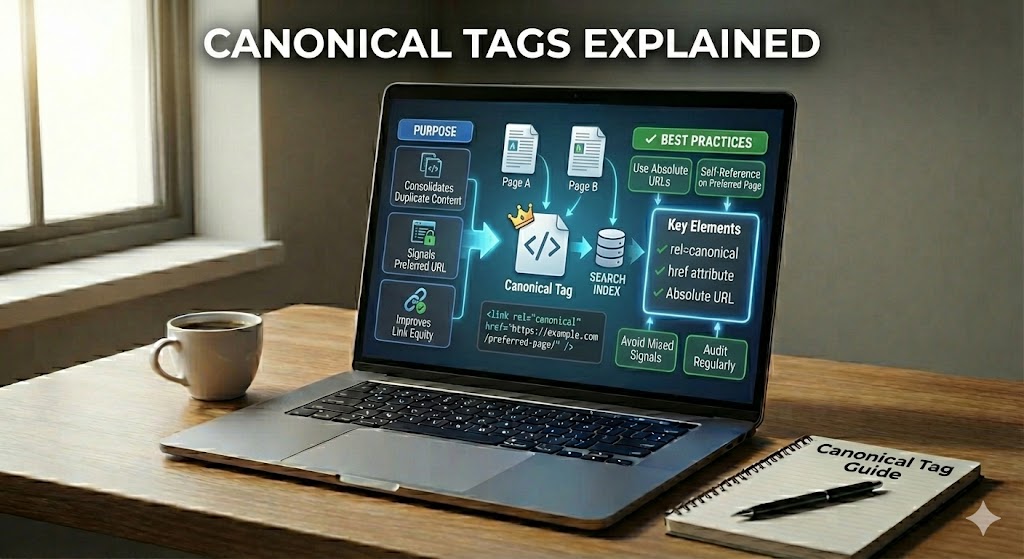
To address this, SEO relies on something called a canonical tag. This small piece of HTML code tells search engines which version of a page is the “main” or preferred one. You can think of it as a clear signal that says, “This is the original page; treat the others as copies.”
When canonical tags are implemented correctly, they help search engines focus on the right URL, combine ranking signals, and avoid many technical SEO problems caused by duplicate URLs.
Canonical Tags Explained – Why Duplicate URLs Hurt SEO
Before learning how to fix duplicate content, it helps to understand why it is a problem in the first place. Duplicate or near-duplicate URLs confuse search engines, scatter important signals, and make it harder for any single page to stand out.
Once you see how this fragmentation affects rankings and crawl efficiency, the role of canonical tags becomes much clearer.
Imagine having three different front doors that all lead into the same room. Visitors might still reach you, but delivery drivers, guests, and mail could end up at different doors. Search engines face a similar challenge when they encounter several URLs that look almost identical.
When multiple addresses show very similar content, each one can collect its own backlinks, clicks, and engagement data. Instead of building one strong page, those ranking signals get spread thin, making it harder for any single version to become the clear, trusted page to show in results.
This split also wastes valuable crawl budget. Bots may keep revisiting near-duplicate URLs, leaving fewer resources to discover new or updated content. Over time, this can lead to inconsistent indexing, unpredictable rankings, and search engines choosing a version you did not intend to be the main page.
What Is a Canonical Tag in Simple SEO Terms?
Once the risks of duplicate URLs are clear, the next step is to define the tool that helps control them. A canonical tag is your way of telling search engines which version of a page should carry the main authority.
Looking at it in everyday terms makes this technical element much easier to understand and apply correctly.
Think of a bookshelf where the same story appears with different covers. A librarian will select one book as the main copy and treat the others as duplicates. A canonical tag does something very similar for pages that look alike on your site.
In simple terms, a canonical tag is a small piece of HTML code that says, “This URL is the main version of this content.” It uses the rel=”canonical” attribute and is placed in the <head> of a page so crawlers can read it easily.
Here is what it helps search engines understand more clearly:
- Which page is the original when several addresses show near-identical content.
- Where to combine signals such as links, clicks, and other engagement data.
- Which URL to show in search results to avoid confusing, duplicate-looking listings.
Many SEOs describe it as a way to give engines a strong hint about your preferred address. As Matt Cutts once explained, it is not a hard rule, but a powerful signal that guides how similar URLs are treated.
Canonical Tags Explained – Why They Matter for Rankings and Signals
Knowing what a canonical tag is raises the next question: how does it affect your actual search performance? The answer lies in how search engines assign trust, authority, and visibility to competing URLs.
By guiding that process, canonical tags help funnel value into a single, stronger page instead of allowing it to leak across multiple versions.
When two or more URLs share similar content, search engines have to decide which version deserves the most trust. That choice affects how much visibility, traffic, and authority any single page can earn.
Canonical tags help direct that trust. By pointing several look-alike URLs to one preferred address, you indicate where crawlers should focus ranking signals such as links and user engagement. Instead of spreading value thinly, those signals can be consolidated on one main page, making it easier to compete in search results.
This signal also reduces confusion in the index. When rel=”canonical” is used correctly, search engines are more likely to pick your chosen URL as the one to show, avoid weaker duplicates, and treat small URL variations as part of the same underlying page.
How Canonical Tags Work Behind the Scenes
Understanding that canonical tags influence rankings is helpful, but seeing what happens inside search engines makes them even more practical to use. Behind every small tag is a series of checks that determine how much weight it receives.
By knowing this process, you can align your signals and give crawlers fewer reasons to doubt your chosen canonical URL.
When you add a canonical tag, it may look like a tiny change in your HTML, but it quietly triggers several steps inside search engines. Understanding this hidden process makes it easier to use canonical tags with confidence instead of guessing.
Behind the scenes, crawlers follow a kind of checklist to decide whether to trust your hint, how to group similar URLs, and where to send SEO value such as links and signals.
First, the crawler downloads the page and scans the <head> section for a rel=”canonical” link. It then compares the canonical URL you declared with the actual content on the page. If the pages are closely matched in topic and structure, the hint is more likely to be respected. If they look unrelated, the signal may be partly or fully ignored.
After that, search engines place similar URLs into a canonical cluster. Inside this group, one URL is chosen as the canonical representative, and the others are treated as alternate versions. This is where your declared tag competes with other signals, such as internal links, sitemaps, redirects, and even user behavior.
Once the cluster is set, most link equity and other ranking signals from the alternate URLs are consolidated toward the selected canonical. This helps the chosen page become stronger, while its variants are often crawled less frequently to save resources.
- Preferred URL is more likely to appear in search results.
- Duplicates may still be stored but are less visible.
- Crawl budget is focused on the main version over time.
As John Mueller has explained, canonicals are a strong hint, not a strict command, so engines regularly re-evaluate them based on how your site is linked and updated.
Canonical Tags Explained in Real Life: Common Use Cases
Concepts become easier to apply when you see them in everyday situations. Canonical tags show their real power on sites with products, parameters, and alternate layouts that multiply URLs without adding much new content.
By recognizing these patterns, you can quickly spot where rel=”canonical” should be used to keep your site organized and signals focused.
Have you ever tried to buy something online and noticed that the same item appears under several slightly different web addresses? To people, it feels like one page. To search engines, it can look like many. This is where real-world use of canonical tags becomes essential.
Below are everyday situations where a clear rel=”canonical” helps keep things tidy, protects your ranking signals, and tells crawlers which URL should stand out as the main version.
Online shops often create multiple URLs for the same item because of sorting, color choices, or filters. For example, one shirt might be reachable through URLs for size, color, or sale status. In these cases, each variant page can point with a canonical tag to one main product URL so that links and trust are not scattered.
Something similar happens with tracking parameters, such as campaign tags in ads or email links. The visible content barely changes, but added parameters create “new” addresses. Marking the clean version as canonical helps search engines treat all those tagged URLs as copies of the same core page.
Technical details like HTTP vs HTTPS, or the presence of a trailing slash, can also generate duplicates. A site may serve both http://example.com/page and https://example.com/page/, plus versions with or without a final slash. Canonical tags let you signal which precise format should collect authority, even when redirects are already in place.
Content platforms sometimes offer both a print view and a normal view of the same article, or sort the same list by date, price, or popularity. In those situations, the standard, user-facing page is usually set as the canonical, while print or alternate layouts reference it to avoid thin, competing duplicates in search results.
Canonical Tags, Redirects, and Indexing: How They Fit Together
Canonical tags are just one part of the technical SEO toolkit. To avoid mixed signals, they need to work smoothly alongside redirects and your site’s indexing strategy.
Seeing how each tool behaves helps you choose the right one for each situation and prevent conflicts that might weaken your preferred URLs.
Ever noticed that sometimes a URL changes in your browser, and other times it stays the same even though the content feels identical? That difference usually comes from how canonical tags, redirects, and indexing work together behind the scenes.
Each of these tools sends a slightly different message to search engines, and learning how they interact helps you avoid mixed signals that can quietly damage visibility.
A canonical tag keeps users on the current URL but tells crawlers which address is the preferred version for ranking. A 301 redirect, on the other hand, moves both users and bots to a new location and passes most link equity to that target. When both are used, engines will almost always trust the redirect more strongly than the canonical hint.
Indexing decisions sit on top of this. If several pages point their rel=”canonical” to one URL, search engines usually index and show that main version while keeping alternates in the background. However, if internal links, sitemaps, and redirects disagree, crawlers may override your canonicals and pick a different page to index instead.
Common Canonical Tag Mistakes Beginners Should Avoid
Even when you understand the basics, small implementation errors can limit the benefits of canonical tags. Many of these issues come from conflicting signals or tags pointing to the wrong place.
By being aware of these common pitfalls, you can keep your setup clean and make it easier for search engines to follow your guidance.
Even with the best intentions, small errors in canonical setup can quietly undo a lot of SEO work. By spotting these problems early, you protect your site from confusing signals and lost ranking power.
One frequent issue is using multiple canonicals for the same page, such as one in the HTML and a different one in HTTP headers. When these conflict, crawlers may ignore both. Another common slip is pointing a canonical to a non-indexable URL (for example, a page blocked by noindex or by robots.txt), which wastes valuable signals.
Beginners also often mix up redirects and canonicals, adding a canonical to a URL that already 301-redirects elsewhere. In such cases, the redirect usually wins, and the extra tag only adds noise. Similarly, sending a canonical to a completely unrelated topic (for example, a blog post pointing to a category page) can cause engines to distrust your guidance.
- Omitting self-referencing canonicals on key pages.
- Using relative URLs instead of full absolute URLs in the tag.
- Canonicalizing paginated series (page 2, 3, etc.) to page 1 when content is different.
- Auto-generating the same canonical for every template, ignoring unique URLs.
- Forgetting canonicals on parameter-heavy pages (tracking, filters, sorting).
- Changing canonical targets too often, which makes signals unstable.
- Pointing all language versions to a single URL instead of using proper hreflang setup.
Bringing Canonical Tags Together for Stronger SEO
Used correctly, canonical tags offer a straightforward way to show search engines which URLs matter most. They help you preserve link equity, reduce waste in your crawl budget, and keep control over which pages are most likely to appear in search.
From duplicate product pages and tracking parameters to HTTP/HTTPS and trailing slash variations, the same principle applies: use canonical tags to keep signals focused and structure clear. Combined with smart redirects, clean internal linking, and solid indexing choices, they become a quiet but powerful part of your technical SEO toolkit.
Because canonicals are a strong hint rather than a guarantee, the key is to use them consistently and avoid the common mistakes outlined above. That consistency helps search engines better understand your site and supports more stable, long-term visibility for your most important pages.