
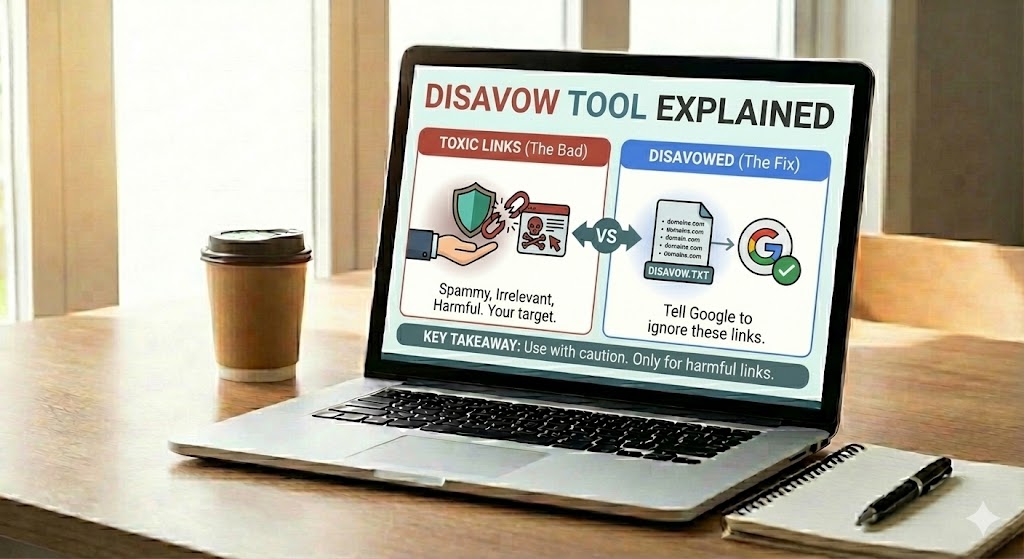
The Google Disavow Links tool is an advanced feature in Google Search Console. It lets eligible site owners submit a list of URLs or domains whose links they want Google to ignore when assessing links to their site.
Most websites do not need to use this tool. Google says its systems can usually assess and ignore many low-quality or spammy links without additional instructions. Disavowing links unnecessarily can remove signals that may be helping your site. This guide explains when the tool may be appropriate, how to investigate a link problem, how to prepare a file and which mistakes to avoid.
This article is about disavow decisions and process. For general link quality and backlink terminology, read Backlinks Explained.
What is the Google Disavow Links tool?
The Disavow Links tool allows a site owner to ask Google to disregard specific incoming links. You submit a plain-text file containing individual linking-page URLs or entire domains. Google treats the file as a strong hint, not as a command to delete links from the web or guarantee a particular ranking outcome.
Disavowing does not remove the link from the source website. The link may continue to appear in backlink tools or in the Links report in Search Console. It also does not repair the underlying cause of a link scheme, remove a manual action automatically or guarantee that rankings will improve.
Google describes this as an advanced feature that should be used with caution. Read its current official Disavow Links instructions before taking action.
When should you consider disavowing backlinks?
Google’s guidance sets a deliberately high threshold. You should consider using the tool only when both of these conditions apply:
- Your site has a considerable number of spammy, artificial or low-quality links pointing to it.
- Those links have caused a manual action, or there is a clear likelihood that they will cause one, because of a link scheme that violates Google’s spam policies.
Examples may include a previous SEO agency buying large numbers of ranking links, a paid-link campaign arranged by the site owner, or participation in a link network. A manual action for unnatural links is a particularly important reason to investigate the issue carefully.
Do not treat a third-party SEO tool’s “toxic backlink” label as proof that Google considers a link harmful. A low authority score, unfamiliar domain, foreign-language page or sudden appearance of random links is not, by itself, sufficient evidence to disavow.
When should you avoid the Disavow tool?
For most sites, the safest decision is not to upload a disavow file. Google says it can generally assess which links to trust without additional guidance. Avoid using the tool in these situations:
- You have no manual action and no clear evidence of a substantial link scheme you created or commissioned.
- A backlink tool labels a domain as toxic based only on its own metrics.
- You have a small number of unrelated, low-quality or automatically generated links that you did not create.
- You want to disavow links simply because the referring site has low Domain Authority or Domain Rating.
- You expect disavowing links to produce a quick ranking boost.
- You have not reviewed the source pages or checked whether the links are genuinely manipulative.
Do not disavow an entire domain just because one page looks poor. Check the actual linking URLs and the wider context first.
Understand the difference between a manual action and an algorithmic ranking change
A Google manual action is a notice that a human reviewer has found that some pages or a site do not comply with Google’s spam policies. You can check for this in the Manual Actions report in Search Console. Google also sends notifications through Search Console.
A decline in clicks, impressions or average position is not automatically a manual action. Search performance can change for many reasons, including competition, demand, content quality, technical issues, search-system changes and seasonality. Do not assume that a ranking drop was caused by backlinks without evidence.
Check the Manual Actions report and review the message carefully. If it identifies unnatural links to your site, follow Google’s recommended cleanup process rather than submitting a disavow file blindly.
How to investigate suspicious backlinks
A careful investigation should establish whether the links are part of a pattern you or an agent created, not simply whether a tool dislikes the referring domain.
- Check Search Console: open the Manual Actions report and look for an unnatural links notice. Save the message and example URLs.
- Export link examples: use the Links report in Search Console to review top linking sites and recently discovered links. You can supplement this with reputable third-party backlink tools.
- Trace the history: check old agency contracts, invoices, campaign reports, emails and link-building spreadsheets. Find out whether links were purchased, exchanged at scale or placed through a network.
- Inspect the source pages: open representative linking URLs. Check the content, placement, anchor text, surrounding links and whether the page appears to exist mainly to manipulate rankings.
- Look for patterns: review groups of links created by the same campaign, network or provider. A pattern is more meaningful than one isolated strange URL.
- Document your findings: record the source URL, domain, destination page, reason for concern, evidence, outreach attempt and result.
Search Console’s Links report is not a complete list of every link on the web. Third-party tools also have their own crawling coverage and metrics. Use these reports as investigation inputs, not as automatic disavow lists.
Try to remove policy-violating links first
If you identify links created through a scheme that violates Google’s policies, make a reasonable effort to get them removed before disavowing them. Google’s manual-action guidance recommends contacting the owners of the linking sites and asking them to remove the links or qualify them so they do not pass ranking credit.
Keep a record of your efforts. Save the URL, date, contact route, message and outcome. If a site owner does not respond or cannot remove the link, document that result. Avoid paying a link-removal service that demands money to remove links it controls or threatens your site.
For paid or sponsored placements that are legitimate advertising, the publisher should qualify the link with rel="sponsored" (or an appropriate nofollow value). Review Google’s outbound link qualification guidance.
How to create a disavow file
Only prepare a file after you have established that disavowal is appropriate. Google requires a plain-text file encoded in UTF-8 or 7-bit ASCII, with a .txt extension. Put one URL or domain entry on each line.
Example file format
# Specific linking pages
https://spam-example.com/article-with-artificial-link.html
https://another-example.net/paid-post.html

# Entire domain, only when the evidence supports domain-wide disavowal
domain:link-network-example.com
Important format rules include:
- Use a full URL to disavow one specific page.
- Use
domain:example.comto disavow a whole domain or subdomain. - You cannot disavow an entire subpath such as
example.com/directory/. - Use one entry per line. Lines beginning with
#are comments and are ignored. - The file must be a plain-text
.txtfile, not a Word document, spreadsheet or PDF. - Check the current Google documentation for file-size and line-count limits before upload.
Be precise. A domain-level entry can affect every link from that domain, including links you may not have intended to disavow. Use it only when the evidence supports treating the whole domain as part of the problematic scheme.
How to upload a disavow file in Google Search Console
- Sign in to the Google account that owns the relevant Search Console property.
- Open Google’s Disavow Links tool.
- Select the supported property for which you are submitting the file.
- Upload the prepared
.txtfile and review any validation errors. - Save a copy of the exact file you uploaded, along with the date and reason for submission.
Property limitation: Google’s Disavow Links tool does not support Domain properties. Follow Google’s current tool instructions to select an eligible property. You must be a property owner to upload a list.
Important: Uploading a new file replaces the existing disavow list for that property. It is not an automatic addition to the previous file. If a list already exists, download it first, review it, and combine the entries you still intend to disavow into the new complete file. Keep dated backups.
After a successful upload, Google needs to recrawl and reprocess relevant pages. Its documentation says this can take a few weeks. Do not expect an immediate change in rankings or in the Links report.
What happens after disavowing links?
Google uses the submitted file as a strong hint when evaluating links. It does not remove the links from the source websites, and disavowed links may remain visible in backlink reports. Reprocessing takes time as Google revisits the relevant pages.
If you are responding to an unnatural links manual action, uploading a file is only one part of the work. You must also address the underlying link scheme, make reasonable removal efforts and submit a reconsideration request through the Manual Actions report once the site complies with Google’s policies. Include clear documentation of what you removed, what you disavowed and what could not be removed.
How to update or undo a disavow file
If you discover that a good link was included by mistake, do not upload a small file containing only the correction. A new upload replaces the existing list. Instead:
- Download the current disavow file from the tool.
- Review every entry against your investigation records.
- Remove entries that you no longer want to disavow, and retain only justified entries.
- Save the corrected complete list as a valid
.txtfile. - Upload the corrected file to the same property and keep a dated backup.
Google also provides an option to cancel all disavowals for a property. Use that only if you intend to remove the entire list. Reprocessing can take time in either case.
Common disavow mistakes
- Disavowing every low-score domain: third-party authority and toxicity scores are not Google’s decision rules.
- Using disavow as routine maintenance: most websites do not need this tool.
- Ignoring the cause: a file does not fix paid-link campaigns, link networks or an agency’s practices.
- Skipping removal attempts: Google recommends trying to remove policy-violating links first.
- Disavowing whole domains too quickly: a domain-level entry can cover legitimate pages as well.
- Overwriting the existing file accidentally: each new upload replaces the previous list for that property.
- Using the wrong property: check the selected property and Google’s property limitations before uploading.
- Expecting instant results: recrawling and reconsideration take time, and no ranking recovery is guaranteed.
- Failing to document decisions: without records, it is difficult to explain a cleanup or safely revise the file later.
A practical disavow decision checklist
Before uploading anything, answer these questions:
- Is there a manual action for unnatural links, or strong evidence of a substantial link scheme that is likely to trigger one?
- Can I connect the suspicious links to a campaign, paid placement, network or other manipulative activity?
- Have I reviewed actual source pages instead of relying only on tool scores?
- Have I tried to remove the links or have I documented why removal was not possible?
- Have I checked that the file contains no legitimate editorial links?
- Have I backed up the existing disavow file and confirmed the correct Search Console property?
- Do I understand that uploading a new file replaces the previous list?
If you cannot answer these questions confidently, pause and get an experienced SEO professional to review the evidence before uploading a file.
Frequently asked questions
Does every website need the Disavow Links tool?
No. Google says most websites do not need it because its systems can generally assess which links to trust. It is intended for exceptional cases involving substantial artificial or spammy links and a manual action or likely manual action.
Can spam backlinks from competitors harm my website?
Do not assume that every unsolicited link is an attack or that it will harm your rankings. Google says it works to prevent actions on third-party sites from negatively affecting a website. Investigate evidence of a real link scheme before considering disavowal.
Should I disavow links marked toxic by Ahrefs, Semrush or another tool?
Not automatically. These tools use their own metrics and classifications. Review the source page, the context and whether there is evidence of a manipulative scheme. A tool score alone is not a reason to disavow.
Will disavowing backlinks improve my rankings?
There is no guarantee. The tool is intended to help address certain serious link-related problems, not to create a ranking boost. If your site has no relevant link issue, disavowing links may be unnecessary or harmful.
Does disavowing a link remove it from the internet?
No. It does not remove the link from the source page. It submits a request to Google about how to treat that link when assessing links to your site.
How long does Google take to process a disavow file?
Google says it can take a few weeks after a successful upload for the list to be incorporated as it recrawls and reprocesses pages. Timing varies, and a ranking change is not guaranteed.
Can I disavow a whole domain?
Yes. The file supports the domain: prefix. Use it only when the evidence justifies disavowing links across the entire domain or subdomain. Otherwise, list the specific URLs.
Does uploading a new file add to the old one?
No. A new upload replaces the existing list for that property. Download and review the current file first, then upload the complete revised list you want Google to use.
Can I use the Disavow tool with a Domain property in Search Console?
No. Google’s current Disavow Links tool documentation says Domain properties are not supported. Check the official instructions for the supported property type before proceeding.
Final thoughts
The Disavow Links tool is not a backlink-cleaning button and should not be part of every SEO audit. Use it only when there is strong evidence of a substantial artificial link pattern and a manual action or a credible risk of one. Investigate carefully, try to remove policy-violating links first, keep complete records and review Google’s instructions before uploading.
When the evidence is unclear, doing nothing is often safer than disavowing legitimate links. A careful decision protects the work you have already invested in building a useful website.