
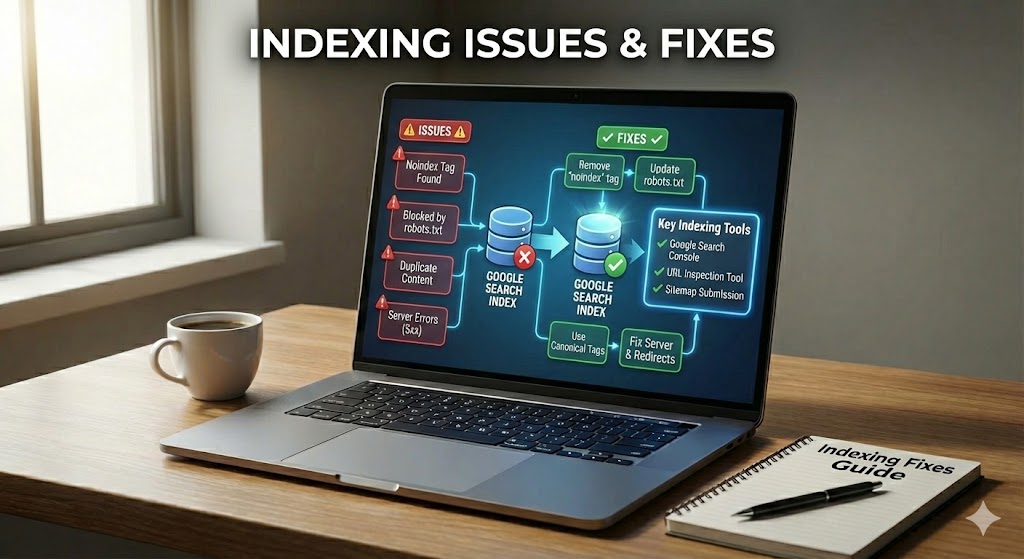
Search engines use a process called indexing to decide which pages from your site can appear in search results. When a page is indexed, it is stored in a huge searchable list, similar to an index at the back of a book. If your page is not in this list, users cannot find it through normal searches.
Indexing issues happen when search engines crawl your site but do not add some pages to this list, or cannot reach them at all. These problems can quietly reduce your search visibility, so even good content gets little or no traffic. In other words, your page exists, but for search engines, it is almost invisible.
This guide explains the most common Indexing Issues & Fixes in simple steps. You will learn what indexing is, how it is different from crawling, why pages may be skipped, and how to fix technical and content problems that block indexing. By the end, you will be able to spot basic indexing problems and take clear, practical steps to help more of your pages show in search.
Indexing Issues & Fixes
New pages that never appear in search can be frustrating, especially when you know the content is useful. Often, the problem is not the quality of the page but a hidden barrier that stops it from being stored in the search index. Understanding these barriers is the first step to bringing more of your content into view.
This section looks at specific technical and content problems that stop pages from being indexed, plus simple ways to fix them. You will see how small settings, tags, or quality issues can quietly hide good pages from users.
Page Not Indexed
Sometimes a page is never added to the index at all. In many cases, this happens when the URL is hard to discover, buried deep in the site, or has no internal links pointing to it.
To improve this, create clear internal links, add the URL to your XML sitemap, and make sure the page returns an HTTP 200 status, not errors like 404 or 500.
Introduction to Indexing Issues & Fixes
Think of your website as a small online library where only some books make it into the catalog. Visitors can still enter, but many titles they would love to read remain hidden. That is what happens when parts of a site suffer from indexing issues.
In this guide, you will look closely at Indexing Issues & Fixes so you can understand why some pages stay hidden and how to bring them into view. Instead of guessing, you will learn to check simple signals, spot patterns, and decide which actions really matter for better search visibility.
As you continue, keep one question in mind: is this page easy for both users and search engines to reach, understand, and trust? Most practical fixes, from improving internal links to correcting tiny tags, are built around that single idea—making every important page simple to find and safe to index.
What Is Indexing and How It Impacts Search Visibility
Before you can fix indexing problems, it helps to be clear on what indexing actually is. Every time you type a question into a search box and see results in less than a second, those results come from a stored list of pages that have already been processed. That stored list is the search index, and being inside it is what lets a page appear at all.
Indexing is the step where a search engine takes a crawled page, reads its content, and saves key information about it in this index. The system notes elements like the main topic, important keywords, links, and structured data, so it can quickly match the page with future searches.
If your page is not indexed, it has zero chance of showing for any query, no matter how strong the content might be. A well-optimized page that is stored correctly in the index can gain impressions, clicks, and traffic, while an unindexed one remains invisible.
- Indexed page = can appear in search results and gain visitors.
- Not indexed page = cannot appear, even if it is technically online.
Difference Between Crawling and Indexing
Many site owners see that their pages are being visited by bots yet still do not show up in search results. This confusion usually comes from mixing up crawling and indexing, which are two separate steps in how search engines work. Knowing the difference makes it easier to pinpoint where problems begin.
Understanding this difference makes it easier to spot where things go wrong in your Indexing Issues & Fixes work, so you know whether to change links, tags, or content.
Crawling is when a search engine’s bot visits your pages, follows links, and downloads code. It acts like a fast robot reader that moves through your site, checking which URLs exist and what they roughly contain.
Indexing comes after that visit. The system processes the page, decides what it is about, and then either stores it in the search index or skips it. A page can be crawled but not indexed if the bot sees it but judges it blocked, duplicated, or low value.
- Crawling = discovery and fetching pages.
- Indexing = storing and deciding if a page can appear in search.
Common Indexing Issues & Fixes Overview
Once you understand how crawling and indexing differ, the next step is to see why some URLs make it through the process and others do not. Often, there is no single dramatic mistake, but a series of small issues that add up. These issues affect how bots discover, interpret, or trust a URL.
In this part of the guide, you will see an overview of the most frequent indexing issues and the main fixes used in basic SEO work. Think of it as a quick map: it shows which problems are technical, which are about content, and which mix both.
Most cases fall into a few clear groups. Some pages are never found, others are crawled but not indexed, and some are blocked on purpose or by mistake with rules and tags. There are also pages that look too similar or too weak to deserve a place in the index.
- Discovery problems: weak internal links, missing sitemaps, or broken URLs.
- Blocking rules: strict robots.txt files or wrong noindex tags.
- Content quality and duplication: repeated text, thin pages, or auto-generated content.
As you move into the more detailed sections, keep this overview in mind. Each later topic drills into one of these groups, showing step‑by‑step Indexing Issues & Fixes you can apply on real sites.
Specific Indexing Issues & Fixes for Your Pages
Looking at broad categories is helpful, but real progress comes from solving concrete problems on specific URLs. Many indexing issues trace back to a small configuration error or a subtle content signal that is easy to miss. Focusing on these recurring patterns helps you fix more pages with less effort.
In this part, you will walk through concrete situations: URLs that are not picked up, pages that are crawled but skipped, and content that looks too similar or too weak. Each small example shows how a tiny change in status code, tag, or layout can decide whether a page is safely stored in the index.
One frequent problem is a URL that looks live in your browser but quietly returns the wrong signal to bots. A page that shows normal content to users yet answers with anything other than a 200 OK status can be dropped from the index. Checking server responses, cleaning redirect chains, and removing “soft 404” pages are simple steps that often restore visibility.
- Make sure important pages send a clear HTTP 200 status.
- Avoid long chains of redirects or temporary (302) hops where a permanent (301) is needed.
- Fix “soft 404s” where very thin or error-like pages pretend to be normal content.
Another common reason for failure is poor site structure. When a URL has only one weak link from a footer or no entry in the XML sitemap, it may be crawled rarely or not at all. Strengthening internal linking, adding the URL to a clean sitemap, and grouping related content into clear topic hubs all help search engines see the page as part of a useful structure.
“Good architecture is invisible to users but obvious to crawlers.” — Bill Slawski
How SEO Best Practices Reduce Indexing Problems
Fixing issues page by page can work in the short term, but it quickly becomes tiring if the same problems keep returning. A better approach is to build strong SEO best practices into how you design and maintain your site. That way, many indexing issues are prevented before they appear.
Instead of fixing every URL one by one, good routines create a site that is easy to crawl, simple to understand, and safe to index. When the basic structure, tags, and content are clean, many errors like “page not indexed” or “crawled but not indexed” happen far less often.
A few core habits matter most. Keep a clear internal linking plan so every important page has helpful links from other pages. Use neat, consistent meta tags, avoid mixing noindex with canonical tags by mistake, and make sure each template shows enough real value, not just copied text.
- Plan a simple site structure where key pages are never more than a few clicks deep.
- Maintain an up‑to‑date XML sitemap that only lists real, 200 OK URLs.
- Use robots.txt to guide crawling, not to hide pages that should rank.
- Write unique, human‑friendly titles and descriptions to avoid duplicate signals.
Over time, these small choices work together. Search engines spend less time on broken or weak URLs and more time on pages that truly matter, which gently increases your overall search visibility without constant emergency fixes.
Related Technical SEO Topics for Further Study
Once you are comfortable spotting and fixing basic indexing issues, it is natural to look at the wider technical picture. Several connected areas of technical SEO can quietly support or undermine your indexing work. Learning them gradually will make your improvements more stable and long‑lasting.
The topics below are not required to start, but learning them step by step will help you build a site that is fast, clear, and simple for bots to understand.
- XML sitemaps and HTML sitemaps – how clean sitemaps guide crawlers toward your most important URLs and support better search visibility.
- Robots.txt optimization – using rules to control crawl paths without blocking valuable pages that should be indexed.
- Canonical tags and URL parameters – managing duplicate content so search engines know the preferred version of similar pages.
- Site speed and Core Web Vitals – why faster, more stable pages are easier to process, helping bots handle more URLs on each crawl.
- Structured data using schema.org – adding clear, machine-readable clues about products, articles, or events.
- Mobile-first optimization – ensuring that the mobile version of your site is complete, since it is often used for both crawling and indexing.
- Log file analysis – reading server logs to see how often bots visit, which paths they follow, and where crawl budget may be wasted.
- International and multilingual setup with hreflang – guiding search engines to show the right language or region version in each market.
Bringing Your Pages Into Clear View
Indexing success is less about tricks and more about helping search engines genuinely find, understand, and trust your pages. When you remove hidden blocks, improve content quality, and send clean signals, your site has a much better chance to maintain strong search visibility.
Remember the core ideas: treat crawling and indexing as separate steps, fix common issues like incorrect status codes, blocking rules, and weak internal links, and rely on solid SEO habits so problems appear less often. If every important page clearly answers why it deserves a place in the index, search engines can surface your work—and users are far more likely to discover it.