
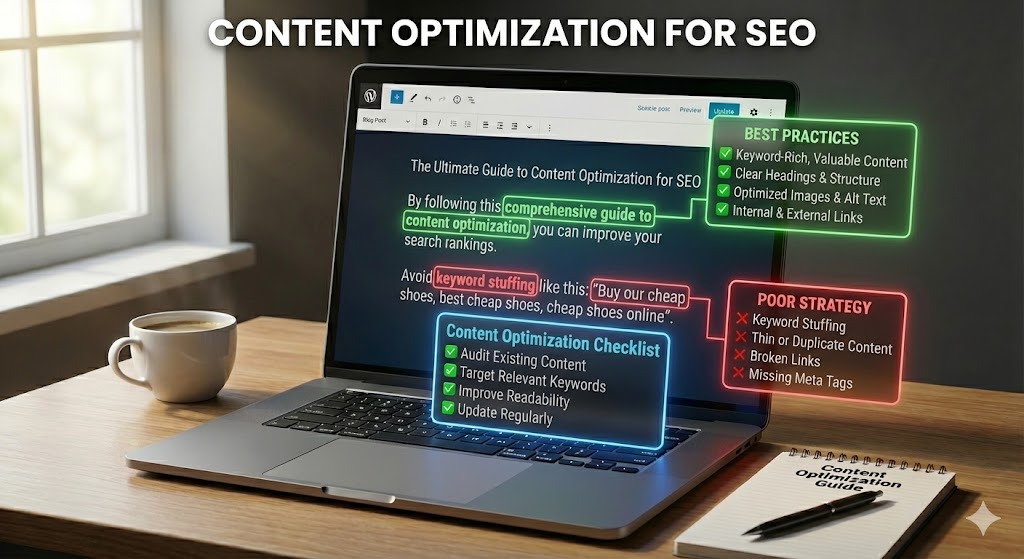
Content optimization for SEO is the process of improving existing or new website content so it meets the reader’s needs, communicates its topic clearly and can be discovered and understood by search engines. It combines editorial quality, search intent, page structure, internal linking, useful media and technical checks. It is not simply adding more keywords or increasing an article’s word count.
This guide gives you a repeatable method to optimize blog posts, service pages, product pages and category pages. It also explains how to decide which pages to update, how to measure results and when to create a new page instead of rewriting an existing one.
What Is Content Optimization in SEO?
Content optimization means reviewing a page against its purpose and improving the information, presentation and supporting elements that help users complete their task. That may mean correcting outdated facts, answering a missing question, making a confusing section clearer, adding a useful example, improving internal links or fixing a misleading title.
A good optimization begins with the reader. Search data can help you understand what people are looking for, but the finished page must provide a satisfying answer—not just include the phrases found in keyword tools.
Content Optimization vs Content Creation vs Content Refresh
| Activity | What it means | When to use it |
|---|---|---|
| Content creation | Producing a new page to meet a distinct audience need | A useful topic or search intent is not covered by an existing page |
| Content optimization | Improving the usefulness, clarity, structure and discoverability of a page | A page exists but can better serve its intended audience |
| Content refresh | Updating information that has become outdated or incomplete | Facts, products, regulations, tools, examples or user expectations have changed |
These activities can overlap. A refresh is often one part of a broader optimization project. Avoid publishing a new URL when an existing page already serves the same intent and can be improved.
Why Content Optimization Matters
- Better answers: readers can find accurate, relevant information without unnecessary filler.
- Clearer page purpose: titles, headings and focused sections explain what the page covers.
- Improved navigation: relevant internal links help people explore connected topics.
- Stronger trust: current facts, transparent authorship and reliable references help readers assess information.
- Better business outcomes: useful pages can support enquiries, purchases, subscriptions or other meaningful actions.
- More efficient publishing: improving a suitable existing page may be more useful than creating another overlapping article.
Optimization does not guarantee higher rankings or traffic. Search results depend on many factors, including relevance, competition, technical accessibility and changing user needs. Make changes because they improve the page, then measure the outcome.
Step 1: Select the Right Page to Optimize
Start with a clear business or editorial reason. Do not update every URL simply because it is old. Prioritize pages where an improvement can make a meaningful difference.
Useful candidates include:
- Pages receiving impressions but few relevant clicks.
- Pages ranking for queries that the content only partly answers.
- Important pages with outdated details, broken links or missing sections.
- Pages with valuable backlinks or existing traffic that should be protected.
- Service or product pages that attract visitors but do not explain the offer clearly.
- Pages competing with another URL on your own site for the same search intent.
Use Google Search Console to review page-level clicks, impressions, queries, CTR and average position. Compare similar date ranges and check whether demand or seasonality changed. Use analytics data to understand conversions and on-site behavior where tracking is reliable.
Step 2: Understand Search Intent and Audience Needs
Search intent is the task or goal behind a query. A person searching “how to optimize a blog post” expects instructions. Someone searching for a content optimization agency may want service details, proof of experience and a way to request a proposal.
Use this process:
- Write down the primary query and the audience you want to help.
- Review the search results to understand the formats and topics that currently satisfy the query.
- Identify the questions and decisions the reader needs help with.
- Check whether the page’s current format matches that need.
- Decide what unique experience, evidence or practical detail your page can add.
Search results are research inputs, not a template to copy. Your goal is to create a more useful and accurate resource, not to reproduce competitors’ headings word for word. Learn more in the search intent guide.
Step 3: Review Queries and Identify Content Gaps
Open the Search Console Performance report and filter by the page URL. Review the queries that generated impressions and clicks. Group them by the question or task they represent rather than treating every query variation as a separate topic.
Look for:
- Relevant queries: searches that match the page’s purpose and audience.
- Missing answers: important questions that the page does not address well.
- Unexpected queries: terms that suggest the page is unclear or is appearing for an unintended topic.
- CTR opportunities: queries where the result is visible but the title and snippet may not communicate the page’s value clearly.
- Intent mismatch: searches for which the page format or depth does not meet the searcher’s need.
Do not add every query to the content. Some queries may be irrelevant, too broad or better served by another page. Use judgement to protect a clear page focus.
Step 4: Check for Keyword Cannibalization and Topic Overlap
Keyword cannibalization is often used to describe situations where multiple pages on a site target very similar topics or search intent. Similar keywords alone do not prove a problem. The important question is whether the pages serve distinct needs or compete to answer the same one.
Search your site and review Search Console data to identify overlapping URLs. If two pages genuinely answer the same task, consider combining their strongest information into one page and redirecting the retired URL where appropriate. If the intents differ, make the distinction clear in each page’s title, content and internal links.
Do not merge pages just because they share a word. Preserve useful pages that serve different audiences, locations, products or stages of a decision.
Step 5: Improve the Main Answer and Content Quality
The most important improvement is often editorial. Make sure the page answers its main question early, explains the details accurately and gives the reader a useful next step.
- Lead with the answer: explain the main point near the beginning.
- Remove repetition: delete introductions and sections that repeat the same idea without adding value.
- Fill genuine gaps: add missing steps, examples, definitions, comparisons or limitations that help readers.
- Use evidence: support important claims with primary sources, reliable research or clearly described first-hand experience.
- Show expertise honestly: include real authorship, practical experience and review information where relevant.
- Be balanced: explain risks, exceptions and uncertainty rather than making absolute promises.
- Keep the scope focused: move unrelated subtopics to their own useful pages when necessary.
There is no ideal word count for every page. A concise page can be complete; a complex subject may require more depth. Do not add content merely to make a page longer than competing pages.
Step 6: Optimize Titles, Headings and Search Snippets
Write a unique, descriptive title that accurately represents the page. Use the main heading to make the page topic clear to visitors. Google may generate title links and snippets using multiple page signals, so there is no guarantee that the exact text you write will always appear in search.
For titles and headings:
- State the page’s main topic clearly.
- Make each important page title distinct and accurate.
- Use headings to organize real sections, not to repeat keywords.
- Avoid vague, exaggerated or misleading claims.
- Do not rely on a fixed character count as a ranking formula.
Write a useful meta description that summarizes the page and its value. Google may use it as a snippet or generate different text from the page, depending on the query. A meta description is not a direct ranking factor. See the guides to SEO title tags and meta description optimization.
Step 7: Use Keywords Naturally and Add Helpful Related Terms
Choose a central topic and use language that helps readers understand it. Related terms should appear because they are relevant to the explanation, not because a tool recommends a particular density.
- Use the primary phrase naturally in prominent page elements when appropriate.
- Include synonyms and related concepts when they improve clarity.
- Use specific terms for products, services, locations and processes accurately.
- Avoid repeating exact-match phrases in every paragraph or heading.
- Do not hide text or add irrelevant keywords to attract unrelated traffic.
There is no universal keyword density or required frequency. Read the keyword placement guide for practical examples.
Step 8: Improve Structure and Readability
Make the page easy to scan without removing the detail that readers need. Use a clear H1, descriptive H2 sections and H3 subsections where they help explain a topic.
- Keep paragraphs focused on one main idea.
- Use numbered lists for sequences and bullet lists for related points.
- Use tables when readers need to compare options or data.
- Explain technical terms and abbreviations.
- Place important information where readers can find it easily.
- Check the layout on mobile as well as desktop.
Do not force every article into the same template. The structure should follow the reader’s task and the type of information being presented.
Step 9: Add Useful Internal and External Links
Internal links connect related pages on your site. Add links where they help readers understand a concept, complete a task or explore a relevant next step. Use descriptive anchor text and check that the destination works.
External links are useful when they support a claim or direct readers to an authoritative resource. For technical instructions, policy statements and product documentation, prefer the original source where possible.
Do not add links merely to reach a target count. Avoid excessive exact-match anchors and links to low-quality or irrelevant resources. Review the internal linking strategy guide for more detail.
Step 10: Update Images and Other Media
Use images, diagrams, video and other media when they make the content easier to understand or provide evidence that text alone cannot show.
- Use relevant media that adds information.
- Write meaningful alt text for informative images; use empty alt text for decorative images.
- Use captions when context or attribution is needed.
- Compress files and serve suitable dimensions and formats.
- Check that embedded media works on mobile and does not block the main content.
- Respect copyright and obtain permission where required.
Do not use alt text as a list of target keywords. Describe the image’s purpose accurately and naturally.
Step 11: Review Trust, Accuracy and Content Maintenance
Readers need to know whether the information is reliable, especially for subjects that affect health, finances, safety or legal decisions. Check facts, identify the source of important claims and make the author’s relevant experience clear where appropriate.
For ongoing maintenance:
- Correct facts, broken instructions, outdated screenshots and expired offers.
- Recheck statistics and links against their original sources.
- Update product details, prices or regulations only after verification.
- Remove claims that cannot be supported.
- Use a visible last-updated date only when a meaningful update has actually occurred.
- Keep a record of major changes so you can interpret later performance data.
Freshness is not a goal by itself. A page that remains accurate may not need a date change or a rewrite just because time has passed.
Step 12: Check Technical Accessibility and Indexing
Content improvements cannot help searchers if the intended page is unavailable or blocked from indexing. Check the technical basics after editing:
- Confirm the page loads successfully and returns the intended HTTP status.
- Check that important content is accessible to users and search engines.
- Review robots.txt and meta robots directives for accidental blocks.
- Check that the canonical URL points to the preferred page version.
- Confirm important internal links are crawlable and lead to the correct destination.
- Review mobile usability and performance issues that affect visitors.
- Use Search Console URL Inspection and Page Indexing reports to investigate indexing status.
Do not assume that submitting a URL guarantees indexing. Search engines decide which pages to index. See the guides to technical SEO, canonical tags and indexing issues.
Content Optimization by Page Type
Blog posts and educational guides
Answer the main question early, explain concepts in a logical order, use original examples and link to deeper resources. Include references for important claims and update the article when information changes. Avoid padding a simple answer with unrelated sections.
Service pages
Explain who the service is for, the problem it solves, what is included, how the process works and what happens next. Use real examples or case studies only when they are accurate and approved for publication. Make contact options clear without making unsupported guarantees.
Product pages
Provide accurate product names, specifications, compatibility, availability, delivery information, return terms and useful images. Explain differences between variants and avoid copying identical descriptions across products. Make pricing and purchase actions easy to understand.
Category and collection pages
Help visitors understand what is included in the category and how to choose between items. Use concise introductory content where it adds value, useful filters and clear product links. Avoid long generic text that pushes products far down the page.
Local landing pages
Include genuine location-specific information, service coverage, relevant proof and accurate contact details. Do not create dozens of near-identical suburb pages by swapping place names. Each location page should offer distinct value for people in that area.
How to Prioritize Content Updates
Use impact, effort and risk to decide what to fix first. The following framework is a starting point, not a substitute for reviewing the actual page and data.
| Priority | Typical issue | Suggested action |
|---|---|---|
| High | Incorrect or harmful information, broken key page, major intent mismatch | Correct or resolve promptly and verify the page |
| High | Important page has substantial impressions but does not answer its main query | Review intent, content gaps, title and page structure |
| Medium | Useful page has outdated examples, weak internal links or unclear sections | Refresh the relevant sections and link contextually |
| Medium | Several pages overlap on the same search intent | Review purpose and consider consolidation only when appropriate |
| Low | Minor wording or formatting issues with little user impact | Include in the next routine editorial review |
A Repeatable Content Optimization Workflow
Before editing
- Record the URL, current title, publication date and purpose.
- Export a suitable baseline from Search Console and analytics.
- Review the page’s queries, audience intent and competing pages on your own site.
- Check accuracy, completeness, internal links and technical accessibility.
- Write a short change plan that explains what needs improvement and why.
During editing
- Improve the answer and remove unnecessary repetition.
- Add only relevant missing sections, examples or evidence.
- Refine the title, headings, summary and natural keyword use.
- Update internal and authoritative external links.
- Check images, accessibility, mobile layout and calls to action.
- Preserve the existing URL unless there is a strong reason to change it.
After publishing
- Check the live page, formatting, links and important user actions.
- Use URL Inspection when you need to investigate the page’s status in Google.
- Record the date and the main changes made.
- Monitor clicks, impressions, query relevance, conversions and indexing reports.
- Allow enough time and data before judging the impact.
- Keep, revise or reverse changes based on evidence and user value.
How to Measure Content Optimization Results
| Metric | What it tells you | Source |
|---|---|---|
| Impressions | How often a page appeared in Google Search | Search Console Performance |
| Clicks and CTR | How often people clicked after seeing the result | Search Console Performance |
| Queries | Which searches generated visibility and clicks | Search Console Performance |
| Average position | An aggregated position measure for the selected data | Search Console Performance |
| Organic sessions | Visits attributed to organic search in your analytics setup | GA4 or analytics platform |
| Conversions | Whether visitors completed valuable actions | GA4 or CRM |
| Engagement | How visitors interacted with the page and site | GA4 or analytics platform |
Compare like-for-like periods and consider seasonality, search demand, site changes and tracking quality. Do not judge an update using one metric alone. More impressions may not mean more qualified traffic, and a higher average position does not automatically mean more conversions.
Common Content Optimization Mistakes
- Writing for search engines instead of readers: the page becomes repetitive and less useful.
- Adding keywords without purpose: unnatural repetition harms clarity and can become keyword stuffing.
- Expanding every article: length is not a substitute for relevance or accuracy.
- Copying competitor structures: the page adds little original value.
- Changing URLs unnecessarily: established links may break without a proper redirect plan.
- Refreshing dates without real updates: a new date does not make stale information current.
- Combining pages without checking intent: useful distinct resources may be lost.
- Adding unsupported claims: exaggerated promises weaken trust.
- Ignoring technical issues: a useful page may remain inaccessible or non-indexable.
- Expecting instant results: search engines need time to recrawl and reassess, and ranking changes are not guaranteed.
Frequently Asked Questions
What is content optimization in SEO?
It is the process of improving a page’s usefulness, accuracy, structure and discoverability so it better serves readers and can be understood by search engines.
How often should I optimize website content?
Review important pages based on their value, performance and how quickly their subject changes. A fixed schedule can help with planning, but update a page when there is a meaningful reason rather than changing it just to make it look fresh.
Should I update old content or publish a new article?
Update an existing page when it already serves the same audience need and can be improved. Create a new article when there is a genuinely distinct topic, intent or audience that deserves its own resource.
Does content optimization guarantee better rankings?
No. Better content can improve usefulness and relevance, but rankings depend on many systems and competing pages. Measure performance and avoid promising a specific position or traffic increase.
What is the ideal word count for SEO content?
There is no universal ideal word count. Write enough to answer the reader’s question accurately and completely. Remove filler and do not add sections solely to reach a target length.
Can AI-generated content be optimized for SEO?
Any content should be reviewed for accuracy, originality, usefulness and clarity, regardless of how it was created. Do not publish unverified claims or large amounts of low-value material. Add genuine human review, experience and editorial responsibility where needed.
Which tools can help with content optimization?
Google Search Console helps review search queries, clicks and impressions. Analytics tools help assess visits and conversions. Crawlers and content editors can help find technical and editorial issues. Tools provide evidence and suggestions, but they cannot decide whether a page genuinely satisfies its audience.
What should I check after updating a page?
Check the live content, links, formatting, mobile experience, indexability and canonical. Record the changes and monitor relevant Search Console and analytics data over a suitable period.
Official Google Resources
- Creating helpful, reliable, people-first content
- Google SEO Starter Guide
- Google guidance on title links
- Google guidance on snippets
- Google link best practices
Final Thoughts
Content optimization is a practical cycle: understand the audience, review the page, improve what matters, publish carefully and measure the outcome. The best updates make information more useful, accurate and easy to navigate—not simply longer or more keyword-heavy.
Start with the pages that matter most to your audience and business. Make each change for a clear reason, keep the original URL stable where possible and use evidence to guide the next improvement.